
 Mybatis

MyBatis简介
MyBatis 是一款优秀的持久层框架,用于简化 JDBC 开发
MyBatis 本是 Apache 的一个开源项目iBatis, 2010年这个项目由apache software foundation 迁移到了google code,并且改名为MyBatis 。2013年11月迁移到Github
官网:https://mybatis.org/mybatis-3/zh/index.html (opens new window)
MyBatis 免除了几乎所有的 JDBC 代码,以及设置参数和获取结果集的工作
# mybatis-config.xml配置文件
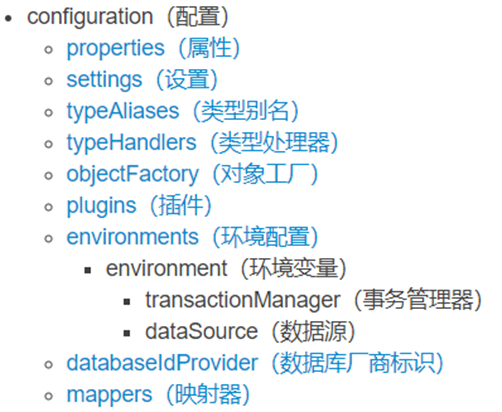
<?xml version="1.0" encoding="UTF-8"?>
<!DOCTYPE configuration
  PUBLIC "-//mybatis.org//DTD Config 3.0//EN"
  "http://mybatis.org/dtd/mybatis-3-config.dtd">
<configuration>
  	<settings>
        <!--在控制台显示SQL语句及查询结果-->
        <setting name="logImpl" value="STDOUT_LOGGING"/>
      	<!--映射适配驼峰命名规则-->
        <setting name="mapUnderscoreToCamelCase" value="true"/>
    </settings>
  	<!--定义实体类别名-->
    <typeAliases>
        <package name="包名"/>
    </typeAliases>
    <environments default="default">
      	<!--环境变量-->
        <environment id="default">
          	<!--事务管理器-->
            <transactionManager type="JDBC"/>
          	<!--数据源-->
            <dataSource type="POOLED">
                <property name="driver" value="${driver}"/>
                <property name="url" value="${url}"/>
                <property name="username" value="${username}"/>
                <property name="password" value="${password}"/>
            </dataSource>
        </environment>
    </environments>

  	<!--加载其它映射文件-->
    <mappers>
   		<!--扫描resource文件夹下的指定映射文件-->
        <mapper resource="xml文件名"/>
        <!--package标签: 扫描包里面的所有映射文件-->
        <package name="包名"/>
    </mappers>
</configuration>
2
3
4
5
6
7
8
9
10
11
12
13
14
15
16
17
18
19
20
21
22
23
24
25
26
27
28
29
30
31
32
33
34
35
36
37
38
配置映射文件包扫描注意事项:
前提:(以编译后的target文件夹为准)
- xml映射文件要与接口名一致
- xml映射文件要与接口处于同级目录
mapper映射文件
<?xml version="1.0" encoding="UTF-8"?>
<!DOCTYPE mapper
        PUBLIC "-//mybatis.org//DTD Mapper 3.0//EN"
        "http://mybatis.org/dtd/mybatis-3-mapper.dtd">

<!--namespace配置接口-->
<!--resultType返回值类型如果是集合,
        则只需要写集合存放的泛型即可,自定义类要注意加上包名-->
<mapper namespace="包名.接口名">
    <select id="方法名" resultType="方法返回值类型">
        SQL语句
    </select>
</mapper>
2
3
4
5
6
7
8
9
10
11
12
13
# 手动获取sqlSession对象
// 加载核心配置文件,获取SqlSessionFactory对象(获取resource目录下的资源)
InputStream in = Resources.getResourceAsStream("mybatis-config.xml");

// 获取SqlSession对象
SqlSessionFactory sqlSessionFactory = new SqlSessionFactoryBuilder().build(in);
SqlSession sqlSession = sqlSessionFactory.openSession();

// 执行SQL语句
UserMapper mapper = sqlSession.getMapper(UserMapper.class);
List<User> users = mapper.findAllUsers();
users.forEach(System.out::println);

// 释放资源
sqlSession.close();
2
3
4
5
6
7
8
9
10
11
12
13
14
# MyBatis三种开发方式
- 接口代理的开发方式(重点)
- 传统DAO实现类的开发方式(目前淘汰)
- 使用注解的开发方式(重点)
一般来说,简单sql需求可以用注解方式,复杂sql使用xml配置的方式
# 接口代理的开发方式
开发步骤
- 创建接口添加SQL业务方法
- 配置接口映射文件接口名.xml
- 使用SqlSession对象执行Mapper方法
创建接口添加SQL业务方法
public interface UserMapper {
    List<User> findAllUsers();
    User selectOne(int id);
}
2
3
4
配置接口映射文件UserMapper.xml
<?xml version="1.0" encoding="UTF-8"?>
<!DOCTYPE mapper
        PUBLIC "-//mybatis.org//DTD Mapper 3.0//EN"
        "http://mybatis.org/dtd/mybatis-3-mapper.dtd">

<mapper namespace="com.itheima.mapper.UserMapper">
    <select id="findAllUsers" resultType="com.itheima.pojo.User">
        SELECT * FROM user;
    </select>
    <select id="selectOne" resultType="com.itheima.pojo.User">
        SELECT * FROM user WHERE id=##{id};
    </select>
</mapper>
2
3
4
5
6
7
8
9
10
11
12
13
注意:
| 符号 | 说明 |
|---|---|
| ##{变量名} | 先使用?占位, 后续将具体值赋值给? |
| ${变量名} | 字符串拼接。会存在SQL注入问题 |
| < | 相当于< |
| > | 相当于> |
使用SqlSession对象执行Mapper方法
// 加载核心配置文件,获取SqlSessionFactory对象
InputStream in = Resources.getResourceAsStream("mybatis-config.xml");
// 获取SqlSession对象
SqlSessionFactory sqlSessionFactory = new SqlSessionFactoryBuilder().build(in);
SqlSession sqlSession = sqlSessionFactory.openSession();
//执行SQL语句
UserMapper mapper = sqlSession.getMapper(UserMapper.class);
List<User> users = mapper.findAllUsers();
users.forEach(System.out::println);
// 释放资源
sqlSession.close();
2
3
4
5
6
7
8
9
10
11
**注意:**MyBatis设计使用增删改操作时,若没有提交事务则会自动回滚事务,所以每次我们执行增删改语句后需要手动提交事务。
# 事务
相关API
| 方法 | 说明 |
|---|---|
| sqlSession.commit() | 手动提交事务 |
| factory.openSession(true); | 自动提交事务 |
说明
如果SQL语句每条都是独立的,使用自动提交
如果是多条SQL语句组成一个功能,手动提交
# 获取新增记录的主键值
通过属性useGeneratedKeys得到新增记录的主键值
| 属性 | 说明 |
|---|---|
| useGeneratedKeys | true,使用mysql生成的主键 |
| keyProperty | 实体类中对应的属性 |
示例
<insert id="add" useGeneratedKeys="true" keyProperty="id">
        INSERT INTO user VALUES(null ,##{username},##{birthday},##{sex},##{address});
</insert>
2
3
@Test
public void test3() throws IOException {
	SqlSession session = SqlUtil.getSession();
	UserMapper mapper = session.getMapper(UserMapper.class);
	User user = new User("张晓峰", Date.valueOf("2001-10-19"), "女", "福建");
	mapper.add(user);
	System.out.println(user);
	session.close();
}
2
3
4
5
6
7
8
9
# 多条件查询, 参数接收
- 散装参数: 如果方法中有多个参数,需要使用@Param("SQL参数占位符名称")
- 对象参数: 对象的属性名称要和参数占位符名称一致
- Map集合参数: Map的键要和占位符名称一致
示例
public interface UserMapper {
    // 多条件查询
    List<User> selectByCondition(@Param("username") String username,
                                 @Param("sex") String sex);
    List<User> selectByCondition(User user);

    // map集合键为参数名,值为参数值,如:{"id"=id,"username"=username,"sex"=sex}
    // 键名要与mapper配置中的占位符名对应
    List<User> selectByCondition(Map map);
}
2
3
4
5
6
7
8
9
10
<!-- 或者修改SQL语句中的占位,如##{param1}{prarm2}或者{arg1}{arg2} -->
<select id="selectByCondition" resultType="com.itheima.pojo.User">
    SELECT * FROM user WHERE username LIKE ##{username} AND sex=##{sex};
</select>
2
3
4
# 注解开发方式
注解
| 注解名 | 说明 |
|---|---|
| @Select | 查询 |
| @Insert | 添加 |
| @Update | 修改 |
| @Delete | 删除 |
| @Results | 封装映射关系的父注解,相当于<resultMap> value属性:定义了 Result 数组 |
| @Result | 封装映射关系的子注解,相当于<result> id属性 :id=true相当于id标签,false则是result标签 column 属性:查询出的表中字段名称 property 属性:实体对象中的属性名称 one 属性:一对一查询固定属性 many 属性:一对多查询固定属性 |
| @One | 一对一查询,相当于<association> select属性:调用下个查询的接口方法 |
| @Many | 一对多查询,相当于<collection> select属性:调用下个查询的接口方法 |
| @Options | 设置标签属性 仅适用于有主键自增的数据库(Oracle就不适用) useGenerateKeys = true:获取新增语句后自增的键 keyProperty:主键对应的实体类属性 keyColumn:主键对应的表字段 |
| @SelectKey | 获取新增主键 适用于所有的数据库 statement = "select last_insert_id()":查询最后一条插入语句的id before = false:在插入语句前还是后执行true前,false后 keyProperty:主键对应的实体类属性 keyColumn:主键对应的表字段 resultType = 类型.class:主键类型 |
**注意:**注解只支持级联查询方式的多表查询
一对一示例
// 一对一: 通过用户ID查询用户基本信息
@Select("SELECT * FROM user WHERE id=##{id};")
@Results(value = {
        @Result(id = true, column = "id", property = "id"),
        @Result(property = "userInfo", column = "id",
            one = @One(select = "findUserInfo")
        )
})
User findUserById(int uid);

// 一对一: 通过用户ID查询用户扩展信息
@Select("SELECT * FROM user_info WHERE id=##{uid};")
UserInfo findUserInfo(int uid);
2
3
4
5
6
7
8
9
10
11
12
13
一对多示例
@Select("SELECT * FROM user WHERE id=##{id};")
@Results(value = {
        @Result(id = true, column = "id", property = "id"), // 注解开发多表查询需要配置主键
        @Result(property = "userInfo", column = "id",
            one = @One(select = "findUserInfo")
        ),
        @Result(property = "orders", column = "id",
            many = @Many(select = "findOrders")
        )
})
User findUserById(int uid);

// 一对多: 通过用户ID查询用户的所有订单
@Select("SELECT * FROM `order` WHERE user_id=##{uid};")
List<Order> findOrders(int uid);
2
3
4
5
6
7
8
9
10
11
12
13
14
15
# 动态SQL
**动态SQL指的是:**在程序运行时,根据不同的情况,拼接最终执行的sql语句。
# if标签格式
<if test="条件">
  SQL片段
</if>
2
3
**if标签作用:**当条件为true则拼接SQL语句
# where标签
作用:
- 相当于where关键字,自动补全where这个关键字
- 去掉多余的and、or、where关键字
示例
<select id="selectByCondition" resultType="com.itheima.pojo.User">
    SELECT * FROM user
    <where>
        <if test="username!=null and username!=''">
            username LIKE ##{username}
        </if>
        <if test="sex!=null and sex!=''">
             AND sex=##{sex};
        </if>
    </where>
</select>
2
3
4
5
6
7
8
9
10
11
**注意:**if标签内的条件表达式不能大写,也不需要##{}
# choose标签
**作用:**只执行其中一个语句
示例
<select id="findFuzzyNameOrStatus" resultType="brand">
        SELECT * FROM tb_brand
        <where>
            <choose>
            <when test="status!=null">
                `status`= ##{status}
            </when>
            <when test="brandName!=null and brandName!=''">
                AND brand_name LIKE "%"##{brandName}"%"
            </when>
            <when test="companyName!=null and companyName!=''">
                AND company_name LIKE "%"##{companyName}"%"
            </when>
            <otherwise>

            </otherwise>
            </choose>
        </where>
    </select>
2
3
4
5
6
7
8
9
10
11
12
13
14
15
16
17
18
19
# set标签
作用:
- 用在update语句中,相当于set关键字
- 去掉SQL代码片段中后面多余的逗号
示例
<update id="update">
    UPDATE user
    <set>
        <if test="username!=null and username!=''">
            username=##{username},
        </if>
        <if test="birthday!=null"> // Date类型无需和空字符串比较
            birthday=##{birthday},
        </if>
        <if test="sex!=null and sex!=''">
            sex=##{sex},
        </if>
        <if test="address!=null and address!=''">
            address=##{address}
        </if>
    </set>
    WHERE id=##{id};
</update>
2
3
4
5
6
7
8
9
10
11
12
13
14
15
16
17
18
# foreach标签
作用:遍历数组或集合
| foreach标签的属性 | 作用 |
|---|---|
| collection | 参数名 |
| item | 设置变量名,代表每个遍历的元素 |
| separator | 遍历一个元素添加的内容 |
| ##{变量名} | 先使用?占位, 后面给?赋值 |
| open | 在遍历前添加一次字符 |
| close | 在遍历后添加一次字符 |
示例
public interface UserMapper {
    // 批量删除
    void deleteByIds(@Param("ids") int[] ids);
}
2
3
4
<delete id="deleteByIds">
    DELETE FROM user WHERE id IN
    <foreach collection="ids" item="ele" open="(" close=");" separator=",">
        ##{ele}
    </foreach>
</delete>
2
3
4
5
6
# sql标签与include标签
作用
- sql标签:定义一段SQL语句,起个名字可以重用。
- include标签:引入上面定义的SQL代码段。
<!--抽取重复的SQL并取个名字-->
<sql id="commont">
		INSERT INTO user (username,birthday,sex,address) VALUES
</sql>
<insert id="addUsers" parameterType="list">
    <!--引入上面的的SQL-->
    <include refid="commont"/>
    <foreach collection="list" close=";" separator="," item="user">
      (##{user.username},##{user.birthday},##{user.sex},##{user.address})
    </foreach>
</insert>
2
3
4
5
6
7
8
9
10
11
<sql id="sqlCondition">
  <where>
    <if test="status!=null">
      STATUS=##{status}
    </if>
    <if test="brandName!=null and brandName!=''">
      AND brand_name LIKE "%"##{brandName}"%"
    </if>
    <if test="companyName!=null and companyName!=''">
      AND company_name LIKE "%"##{companyName}"%"
    </if>
  </where>
</sql>

<select id="findBySBC" resultType="cn.kk.pojo.Brand">
  SELECT * FROM tb_brand
  <include refid="sqlCondition"></include>
    </select>
2
3
4
5
6
7
8
9
10
11
12
13
14
15
16
17
18
# MyBatis的参数处理
- 单个参数:
**基本数据类型:**mybatis底层没有处理,直接使用 ##{参数名}
**POJO类型:**mybatis底层没有处理,直接使用 ##{成员属性名},属性名 和 参数占位符名称 一致
**Map集合:**mybatis底层没有处理,直接使用##{键名},键名 和 参数占位符名称 一致
**Collection:**封装为Map集合,可以使用@Param注解,替换Map集合中默认的arg键名
map.put("arg0",collection集合);
map.put("collection",collection集合);
**List:**封装为Map集合,可以使用@Param注解,替换Map集合中默认的arg键名
map.put("arg0",list集合);
map.put("collection",list集合);
map.put("list",list集合);
**Array:**封装为Map集合,可以使用@Param注解,替换Map集合中默认的arg键名
map.put("arg0",数组);
map.put("array",数组);
**其他类型:**直接使用
- **多个参数:**封装为Map集合,可以使用@Param注解,替换Map集合中默认的arg键名
map.put("arg0",参数值1)
map.put("param1",参数值1)
map.put("param2",参数值2)
map.put("agr1",参数值2)
---------------@Param("username") @Param("sex")
map.put("username",参数值1)
map.put("param1",参数值1)
map.put("param2",参数值2)
map.put("sex",参数值2)
最后就是通过foreach标签遍历这个map集合来获取值
org.apache.ibatis.reflection包下的ParamNameResolver类
// Object[] args:存放接收到的参数
public Object getNamedParams(Object[] args) {
    final int paramCount = names.size();

  	// 处理无参的情况
    if (args == null || paramCount == 0) {
      return null;
    }

    // 处理一个参数并且没有注解的情况
    else if (!hasParamAnnotation && paramCount == 1) {
      Object value = args[names.firstKey()];

      // 判断这个参数是否是集合或者数组类型,是则转成Map,否则直接返回
      return wrapToMapIfCollection(value, useActualParamName ? names.get(0) : null);
    }

    // 如果有注解
    else {

       // 定义一个Map集合来装自定义传参
      final Map<String, Object> param = new ParamMap<>();
      int i = 0;

       // 注解内定义的变量名会存入names这么一个Map集合 例:@Param("coll")的coll
      for (Map.Entry<Integer, String> entry : names.entrySet()) {

        // 取出注解属性,存入param集合中 {"coll",参数值}
        param.put(entry.getValue(), args[entry.getKey()]);
        // add generic param names (param1, param2, ...)
        final String genericParamName = GENERIC_NAME_PREFIX + (i + 1);
        // ensure not to overwrite parameter named with @Param

        // {"param(i+1)",参数值} 例:{"param1",参数值}
        if (!names.containsValue(genericParamName)) {
          param.put(genericParamName, args[entry.getKey()]);
        }
        i++;
      }
      return param;
    }
  }
2
3
4
5
6
7
8
9
10
11
12
13
14
15
16
17
18
19
20
21
22
23
24
25
26
27
28
29
30
31
32
33
34
35
36
37
38
39
40
41
42
# resultMap输出映射
使用场景
MyBatis默认使用resultType属性把查询的结果自动封装成Java类对象,但前提是需要查询结果字段名与类成员属性名对应。当查询结果的字段与需要封装的pojo类成员属性名无法对应时,可以使用resultMap标签手动建立查询的列与对象属性的对应关系。
# 表关系
MySQL的多表关系在Java中的体现形式
- **一对一:**在A表的pojo类属性中存放B表的pojo类对象
- **一对多:**在A表的pojo类属性中存放B表的pojo类对象的集合
- **多对多:**在A表的pojo类属性中存放B表的pojo类对象的集合,在B表的pojo类属性中存放A表的pojo类对象的集合;**注意:**java中的多对多是不需要中间表的,拆分为两个一对多就可以了。
resultMap标签
| 属性 | **说明 ** |
|---|---|
| id标签 | 唯一标识,对主键字段进行映射 |
| result标签 | 要封装的类型,对普通字段进行映射 |
| association标签 | 表一对一的映射 |
| collection | 表一对多的映射 |
| type属性 | 映射的pojo类名 |
| column属性 | 表字段名 |
| property属性 | 映射字段名 |
| autoMapping属性 | 启用自动映射名字对应的属性,但不能省略主键 |
示例
<!--user表-->
<resultMap id="UserMap" type="User" autoMapping="true">
    <id column="id" property="id"/>
    <!--association: 一对一的映射-->
    <association property="userInfo" resultMap="UserInfoMap"/>
  	<!--collection: 一对多的映射-->
  	<collection property="orders" resultMap="OrderMap"/>
</resultMap>

<!--user_info表-->
<resultMap id="UserInfoMap" type="UserInfo" autoMapping="true"/>

<!--order表-->
<resultMap id="OrderMap" type="Order">
    <id column="oid" property="oid"/>
    <result column="user_id" property="userId"/>
    <result column="number" property="number"/>
    <result column="create_time" property="createTime"/>
    <result column="note" property="note"/>
</resultMap>
2
3
4
5
6
7
8
9
10
11
12
13
14
15
16
17
18
19
20
**补充:**在核心配置文件中使用settings设置mapUnderscoreToCamelCase为true可以映射下划线为驼峰命名法。例:<setting name="mapUnderscoreToCamelCase" value="true"/>
**扩展:**可以通过collection灵活配置需要映射的字段
<!--role表-->
<!--ofType:映射的pojo类-->
<collection property="users" ofType="User">
	<id column="id" property="id"/>
    <result column="username" property="username"/>
    <result column="birthday" property="birthday"/>
    <result column="sex" property="sex"/>
    <result column="address" property="address"/>
</collection>
2
3
4
5
6
7
8
9
# 级联查询
级联查询是支持延迟加载的:当一张表中的数据没有被访问时,不会执行sql语句
延迟加载需要在settings中配置:<**setting **name="lazyLoadingEnabled" value="true"/><**setting **name="aggressiveLazyLoading" value="false"/>
association:一对一的级联查询
参数
| association标签的属性 | 说明 |
|---|---|
| property | 指定另一方在当前实体类中属性名 |
| column | 当前查询结果的字段值,以及传给下一个SQL需要的参数 |
| select | 下一个执行的查询的接口方法名字 |
示例
<resultMap id="UserMap" type="User" autoMapping="true">
    <id column="id" property="id"/>
    <!--association: 一对一的映射-->
    <association property="userInfo" select="findUserInfoById" column="id"/>
</resultMap>

<select id="findUserById" resultMap="UserMap">
    SELECT * FROM USER WHERE id=##{uid};
</select>

<select id="findUserInfoById" resultType="UserInfo">
    SELECT * FROM user_info WHERE id=##{uid};
</select>
2
3
4
5
6
7
8
9
10
11
12
13
**注意:**association级联查询中的下一个查询需要的参数必须只有一个
collection:一对多的级联查询
参数
| collection标签的属性 | 说明 |
|---|---|
| property | 指定另一方在当前实体类中属性名 |
| column | 当前查询结果的字段值,以及传给下一个SQL需要的参数 |
| select | 下一个执行的查询的接口方法名字 |
示例
<resultMap id="UserMap" type="User" autoMapping="true">
    <id column="id" property="id"/>
    <collection property="orders" select="findOrders" column="id"/>
</resultMap>
<!--通过用户ID查询用户的基本信息-->
<select id="findUserById" resultMap="UserMap">
    SELECT * FROM USER WHERE id=##{uid};
</select>

<!--通过用户ID查询用户的所有订单-->
<select id="findOrders" resultType="Order">
    SELECT * FROM `order` WHERE user_id=##{uid};
</select>
2
3
4
5
6
7
8
9
10
11
12
13
**补充:**可以在mybatis核心配置文件的settings中添加<**setting **name="logImpl" value="STDOUT_LOGGING"/>显示执行的SQL语句
# MyBatis缓存
简介
MyBatis框架提供了缓存策略,通过缓存策略可以减少查询数据库的次数,提升系统性能。在MyBatis框架中缓存分为一级缓存和二级缓存。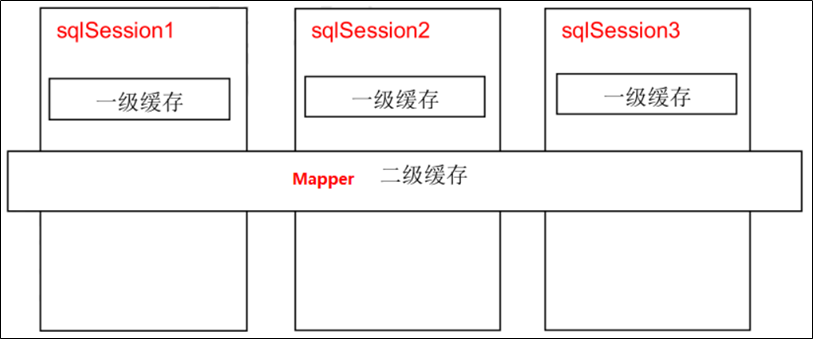
# 一级缓存
一级缓存是sqlSession范围的缓存,只能在同一个sqlSession内部有效。它本身已经存在,一级缓存不需要手动处理,可以直接使用。
第一次查询数据时,会将查询的数据放入一级缓存中。后面的相同查询直接从缓存中获取。
**注意:**一级缓存是 SqlSession 范围缓存。当调用 SqlSession 的修改、添加、删除、提交、关闭等方法时,一级缓存会被清空。
手动清除缓存:sqlSession.clearCache();
# 二级缓存
二级缓存是mapper映射级别缓存,作用范围跨越SqlSession,即可以在多个SqlSession之间共享二级缓存数据。
使用二级缓存的注意事项:
- 实体类需要实现Serializable接口
- 因为二级缓存作用范围跨越SqlSession,所以当缓存不够用时,会序列化到文件中
- 在 mybatis-config.xml 配置开启二级缓存
- 在settings标签中添加
<setting name="cacheEnabled" value="true">
- 在settings标签中添加
- 在 XXXMapper.xml 开启二级缓存使用
- 在映射文件中添加
<cache/>标签,用于声明该映射文件中的所有查询结果都会放到二级缓存中
- 在映射文件中添加