
 Spring Boot
# 概述
SpringBoot是由Pivotal团队提供的全新框架,其设计目的是用来简化Spring应用的初始搭建以及开发过程
Spring程序缺点
- 配置繁琐
- 依赖设置繁琐
SpringBoot程序优点
- 自动配置
- 起步依赖(简化依赖配置)
- 辅助功能(内置服务器,……)
# 使用步骤
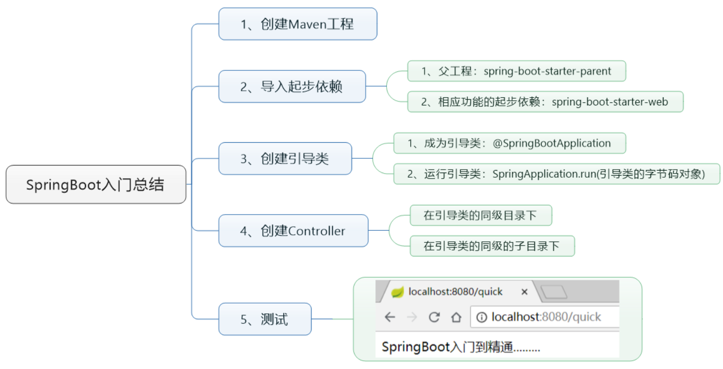
- 新建普通maven模块,配置pom.xml中最简SpringBoot程序所包含的基础文件
<groupId>com.itheima</groupId>
<artifactId>spring-boot-quck-start</artifactId>
<version>1.0-SNAPSHOT</version>

<!-- 1.使用spring-boot的父模块 -->
<!-- 所有springboot工程都是继承于这个工程 -->
<parent>
  <artifactId>spring-boot-starter-parent</artifactId>
  <groupId>org.springframework.boot</groupId>
  <version>2.5.0</version>
</parent>

<dependencies>
  <!-- 2. 使用web的起步依赖 -->
  <!-- 开发springmvc框架的web工程需要导入web相关的依赖包 -->
  <dependency>
    <groupId>org.springframework.boot</groupId>
    <artifactId>spring-boot-starter-web</artifactId>
  </dependency>
</dependencies>
2
3
4
5
6
7
8
9
10
11
12
13
14
15
16
17
18
19
20
- 定义控制器类
import org.springframework.web.bind.annotation.RequestMapping;
import org.springframework.web.bind.annotation.RestController;

@RestController
@RequestMapping("/demo1")
public class Demo1QuckStartController {

    @RequestMapping("/hello")
    public String hello() {
        System.out.println("你好!Spring Boot!");
        return "Hello, Spring Boot!";
    }
}
2
3
4
5
6
7
8
9
10
11
12
13
- 创建Spring的启动程序
/**
 * 1.类命名约定:以Application结尾
 * 2.这个类应该放在其它所有类的同级包或父包中,会自动扫描同级包及其子包下的所有注解
 * 3.启动类需要添加注解 @SpringBootApplication
 */
@SpringBootApplication
public class QuickStartApplication {

    public static void main(String[] args) {
        //启动Spring的应用程序: 1. 启动类的类名  2. main函数上参数
        SpringApplication.run(QuickStartApplication.class, args);
    }
}
2
3
4
5
6
7
8
9
10
11
12
13
- 工程结构
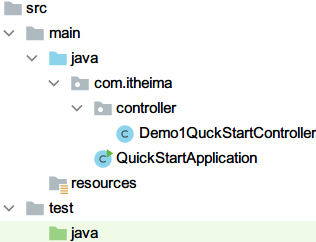
- 执行结果
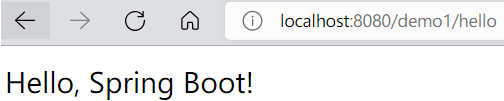
Spring程序与SpringBoot程序对比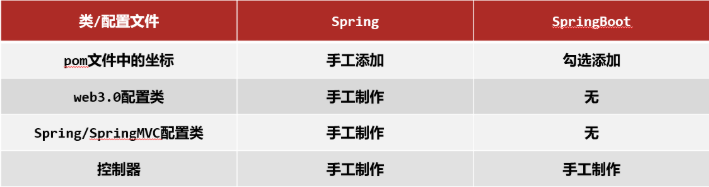
基于idea开发SpringBoot程序需要确保联网且能够加载到程序框架结构
# SpringBoot项目快速启动
注意事项:jar支持命令行启动需要依赖maven插件支持,请确认打包时是否具有SpringBoot对应的maven插件。
<build>
    <plugins>
        <plugin>
            <groupId>org.springframework.boot</groupId>
            <artifactId>spring-boot-maven-plugin</artifactId>
        </plugin>
    </plugins>
</build>
2
3
4
5
6
7
8
① 对SpringBoot项目打包(执行Maven构建指令package)
② 执行启动指令
java -jar spring-boot-quick-start-0.0.1-SNAPSHOT.jar # 项目的名称根据实际情况修改
运行效果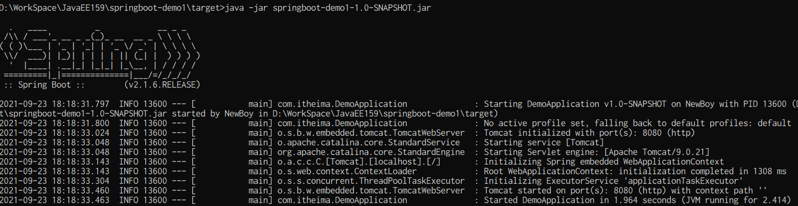
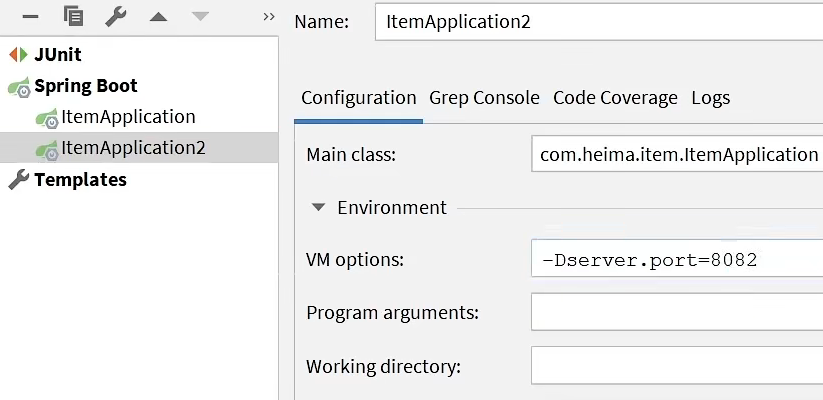
# IDEA开启两个Tomcat操作
# 起步依赖
**starter **
SpringBoot中常见项目名称,定义了当前项目使用的所有项目坐标,以达到减少依赖配置的目的
<project xmlns="http://maven.apache.org/POM/4.0.0"
         xsi:schemaLocation="http://maven.apache.org/POM/4.0.0 http://maven.apache.org/xsd/maven-4.0.0.xsd"
         xmlns:xsi="http://www.w3.org/2001/XMLSchema-instance">
    <modelVersion>4.0.0</modelVersion>
    <groupId>org.springframework.boot</groupId>
    <artifactId>spring-boot-dependencies</artifactId>
    <version>2.5.0</version>
    <packaging>pom</packaging>
    <properties>
        <servlet-api.version>4.0.1</servlet-api.version>
        ...
    </properties>
</project>
2
3
4
5
6
7
8
9
10
11
12
13
**parent **
所有SpringBoot项目要继承的项目,定义了若干个坐标版本号(依赖管理,而非依赖),以达到减少依赖冲突的目的
<?xml version="1.0" encoding="UTF-8"?>
<project xmlns="http://maven.apache.org/POM/4.0.0"
         xsi:schemaLocation="http://maven.apache.org/POM/4.0.0 http://maven.apache.org/xsd/maven-4.0.0.xsd"
         xmlns:xsi="http://www.w3.org/2001/XMLSchema-instance">
    <modelVersion>4.0.0</modelVersion>
    <parent>
        <groupId>org.springframework.boot</groupId>
        <artifactId>spring-boot-dependencies</artifactId>
        <version>2.5.0</version>
    </parent>
    <artifactId>spring-boot-starter-parent</artifactId>
    <packaging>pom</packaging>
    ...
</project>
2
3
4
5
6
7
8
9
10
11
12
13
14
- 实际开发
- 使用任意坐标时,仅书写GAV中的G和A,V由SpringBoot提供
- 如发生坐标错误,再指定version(要小心版本冲突)
- mysql的版本锁定是8.0.25,若版本不符需要指定mysql版本号
<?xml version="1.0" encoding="UTF-8"?>
<project xmlns="http://maven.apache.org/POM/4.0.0" xmlns:xsi="http://www.w3.org/2001/XMLSchema-instance"
         xsi:schemaLocation="http://maven.apache.org/POM/4.0.0 https://maven.apache.org/xsd/maven-4.0.0.xsd">
    <parent>
        <groupId>org.springframework.boot</groupId>
        <artifactId>spring-boot-starter-parent</artifactId>
        <version>2.5.0</version>
    </parent>
    <dependencies>
        <dependency>
            <groupId>org.springframework.boot</groupId>
            <artifactId>spring-boot-starter-web</artifactId>
        </dependency>
        <dependency>
            <groupId>org.springframework.boot</groupId>
            <artifactId>spring-boot-starter-test</artifactId>
            <scope>test</scope>
        </dependency>
        <!-- 默认是8.0.25,可以指定版本号 -->
        <dependency>
            <groupId>mysql</groupId>
            <artifactId>mysql-connector-java</artifactId>
            <version>5.1.46</version>
        </dependency>
    </dependencies>
</project>
2
3
4
5
6
7
8
9
10
11
12
13
14
15
16
17
18
19
20
21
22
23
24
25
26
常见起步依赖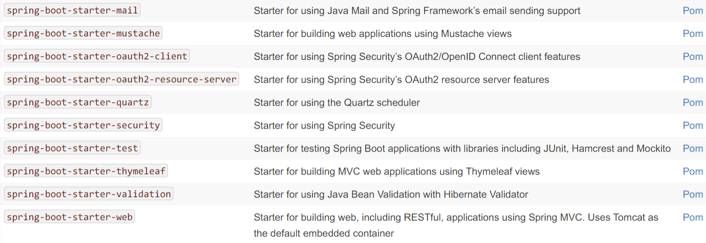
# 辅助功能
- SpringBoot程序启动
@SpringBootApplication
public class SpringBootQuickStartApplication {
    public static void main(String[] args) {
        SpringApplication.run(SpringBootQuickStartApplication.class, args);
    }
}
2
3
4
5
6
- SpringBoot在创建项目时,采用jar的打包方式
- SpringBoot的引导类是项目的入口,运行main方法就可以启动项目
- 使用maven依赖管理变更起步依赖项
分析SpringBoot的自动配置:以tomcat启动为例
- 查看自动配置的spring-boot-autoconfigure的包下的配置文件spring.factories
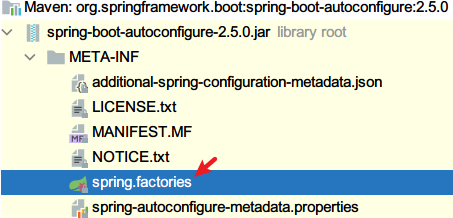
- 文件中包含所有Web容器(Tomcat)自动启动的配置类
org.springframework.boot.autoconfigure.web.servlet.ServletWebServerFactoryAutoConfiguration,\
- 找到Tomcat的启动类, 只有启动项是Tomcat时才创建Bean

- 进入ServerProperties类中查看代码,可以看到端口号的set方法
public void setPort(Integer port) {
	this.port = port;
}
2
3
- 在ServerProperties类中存在一个静态内部类Tomcat,配置了服务器的属性

- 查看默认配置:spring-configuration-metadata.json文件,大约在1213行
{
    "name": "server.port",
    "type": "java.lang.Integer",
    "description": "Server HTTP port.",
    "sourceType": "org.springframework.boot.autoconfigure.web.ServerProperties",
    "defaultValue": 8080
}
2
3
4
5
6
7
# 配置文件
SpringBoot提供了多种属性配置方式
- application.properties
server.port=80
- application.yml
server:
  port: 81
2
- application.yaml
server:
  port: 82
2
SpringBoot配置文件加载顺序
- application.properties > application.yml > application.yaml
注意事项:
- SpringBoot核心配置文件名为application
- SpringBoot内置属性过多,且所有属性集中在一起修改,在使用时,通过提示键+关键字修改属性
# yaml
- YAML(YAML Ain't Markup Language),一种数据序列化格式
- 优点:
- 容易阅读
- 容易与脚本语言交互
- 以数据为核心,重数据轻格式
- YAML文件扩展名
- .yml(主流)
- .yaml
# yaml语法规则
- 大小写敏感
- 属性层级关系使用多行描述,每行结尾使用冒号结束
- 使用缩进表示层级关系,同层级左侧对齐,只允许使用空格(不允许使用Tab键)
- 属性值前面添加空格(属性名与属性值之间使用冒号+空格作为分隔)
- #表示注释
- 核心规则:数据前面要加空格与冒号隔开
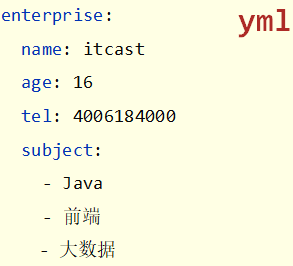
#### yaml数组数据
- 数组数据在数据书写位置的下方使用减号作为数据开始符号,每行书写一个数据,减号与数据间空格分隔
# yaml数据读取
- 使用@Value读取单个数据,属性名引用方式:${一级属性名.二级属性名……}
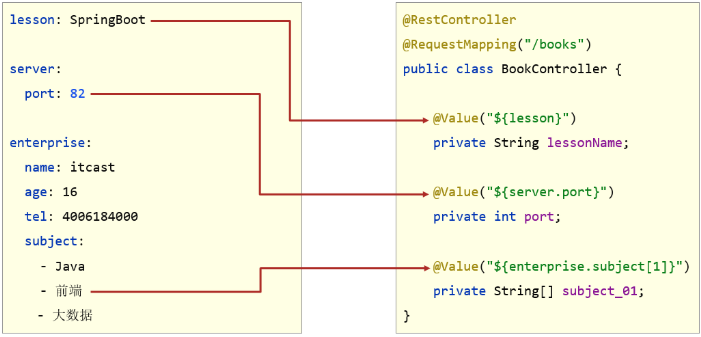
注:这种方式只能注入单个数值
- 封装全部数据到Environment对象(Spring中封装环境变量的属性类)
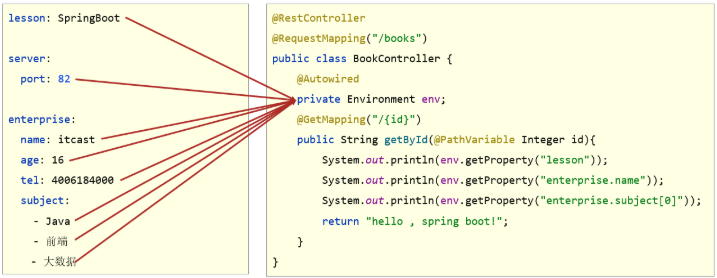
注:数组元素也只能一个个取出来
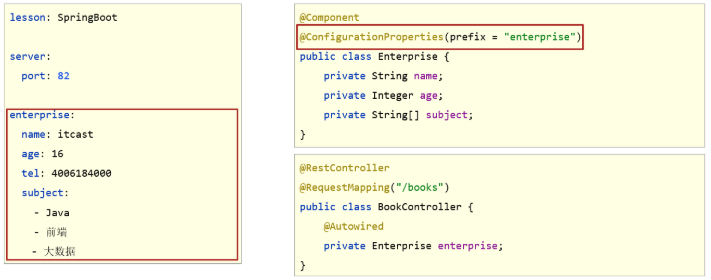
- 自定义对象封装指定数据【常用】
- 将对象添加Spring容器中,在类上添加@Component注解
- 在类上添加@ConfigurationProperties(prefix="指定前缀")
- 添加get和set方法,toString方法
- 在控制器中注入下面Enterprise对象
@Component
@ConfigurationProperties(prefix = "enterprise")
@Data
public class Enterprise {

    private String name;
    private Integer age;
    private String tel;
    private String subject[];
}
2
3
4
5
6
7
8
9
10
注:如果使用lombok需要在pom.xml中导入坐标
<dependency>
    <groupId>org.projectlombok</groupId>
    <artifactId>lombok</artifactId>
</dependency>
2
3
4
当输入@ConfigurationProperties注解的时候,自定义对象封装数据警告解决方案
在pom.xml文件添加以下
<dependency>
    <groupId>org.springframework.boot</groupId>
    <artifactId>spring-boot-configuration-processor</artifactId>
    <optional>true</optional>
</dependency>
2
3
4
5
# 多环境开发配置
# yaml文件多环境启动
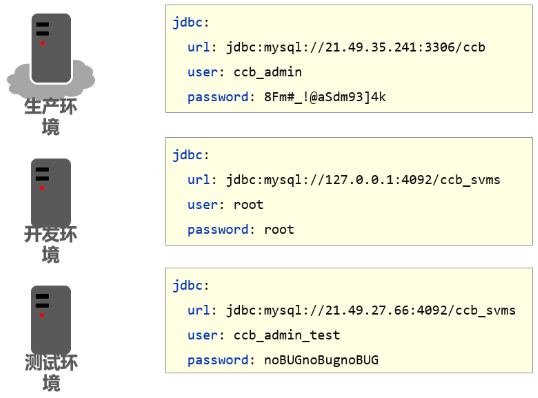
基本配置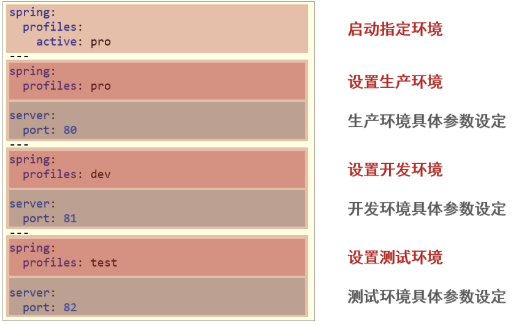
新的写法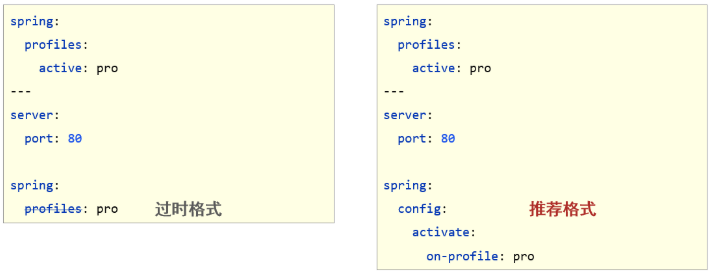
示例
spring:
  profiles:
    active: pro

---
# 生产环境
spring:
  config:
    activate:
      on-profile: pro
server:
  port: 80

---
# 测试环境
spring:
  config:
    activate:
      on-profile: test
server:
  port: 81

---
# 开发环境
spring:
  config:
    activate:
      on-profile: dev
server:
  port: 82
2
3
4
5
6
7
8
9
10
11
12
13
14
15
16
17
18
19
20
21
22
23
24
25
26
27
28
29
30
# properties文件多环境启动
#主启动配置文件 application.properties
spring.profiles.active=pro
2
#环境分类配置文件 application-pro.properties
server.port=80
2
#环境分类配置文件 application-dev.properties
server.port=81
2
#环境分类配置文件application-test.properties
server.port=82
2
# 多环境启动命令格式
- 带参数启动SpringBoot
# 指定哪个配置名
java –jar springboot.jar --spring.profiles.active=test
# 指定具体的参数
java –jar springboot.jar --server.port=88
# 同时指定配置名 端口号
java –jar springboot.jar --server.port=88 --spring.profiles.active=test
2
3
4
5
6
# 多环境开发控制
Maven与SpringBoot多环境兼容(步骤)
先将application.properties中配置全部先注释了
- Maven中设置多环境属性
<profiles>
    <profile>
        <id>dev_env</id>
        <properties>
            <profile.active>dev</profile.active>
        </properties>
        <!-- 默认激活 -->
        <activation>
            <activeByDefault>true</activeByDefault>
        </activation>
    </profile>

    <profile>
        <id>pro_env</id>
        <properties>
            <profile.active>pro</profile.active>
        </properties>
    </profile>

    <profile>
        <id>test_env</id>
        <properties>
            <profile.active>test</profile.active>
        </properties>
    </profile>
</profiles>
2
3
4
5
6
7
8
9
10
11
12
13
14
15
16
17
18
19
20
21
22
23
24
25
26
- SpringBoot中引用Maven属性
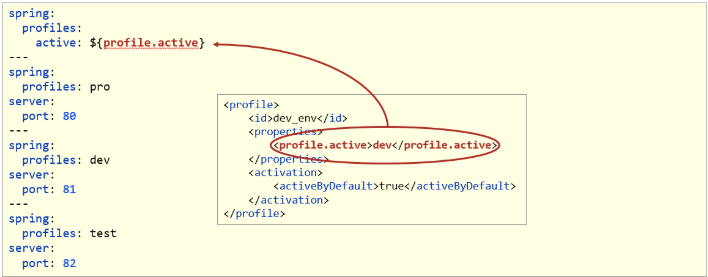
- 对资源文件开启对默认占位符的解析
<build>
    <plugins>
        <plugin>
            <artifactId>maven-resources-plugin</artifactId>
            <configuration>
                <encoding>utf-8</encoding>
                <useDefaultDelimiters>true</useDefaultDelimiters>
            </configuration>
        </plugin>
    </plugins>
</build>
2
3
4
5
6
7
8
9
10
11
- 启动查看控制台输出的结果
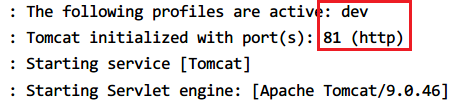
**注:**如果application-dev.properties中的配置也存在,则优先使用这里面的配置,再使用yml中的配置
# Springboot整合静态资源
在Springboot中,默认情况下,一共有4个位置可以放静态资源,分别是resources目录下的:
- /META-INF/resources/
- /resources/
- /static/
- /public/
在这四个文件夹中自动放行静态资源,若同一个文件分别出现在四个目录,则按上述优先级顺序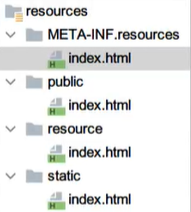
# Springboot整合Junit
Springboot使用**@SpringBootTest**替代了Spring整合Junit时的@RunWith和@ContextConfiguration
使用步骤
【第一步】添加整合junit起步依赖(可以直接勾选)
<dependency>
    <groupId>org.springframework.boot</groupId>
    <artifactId>spring-boot-starter-test</artifactId>
    <scope>test</scope>
</dependency>
2
3
4
5
【第二步】编写测试类
@SpringBootTest
public class BookTest {

    @Autowired
    private BookService bookService;

    @Test
    public void testSave() {
        bookService.save();
    }
}
2
3
4
5
6
7
8
9
10
11
名称:@SpringBootTest
类型:测试类注解
位置:测试类定义上方
作用:设置JUnit加载的SpringBoot启动类
范例:
@SpringBootTest(classes = DemoApplication.class)
class TestSpringBoot{}
2
相关属性
classes:设置SpringBoot启动类
如果测试类在SpringBoot启动类的包或子包中,可以省略启动类的设置,也就是省略classes的设定
# Springboot整合Mybatis
使用步骤
- 配置pom.xml
<parent>
  <artifactId>spring-boot-starter-parent</artifactId>
  <groupId>org.springframework.boot</groupId>
  <version>2.5.0</version>
</parent>

<dependencies>
  <!-- mybatis -->
  <dependency>
    <groupId>org.mybatis.spring.boot</groupId>
    <artifactId>mybatis-spring-boot-starter</artifactId>
    <version>2.2.0</version>
  </dependency>

  <!-- 连接池 -->
  <dependency>
    <groupId>com.alibaba</groupId>
    <artifactId>druid</artifactId>
    <version>1.2.6</version>
  </dependency>

  <!-- 测试 -->
  <dependency>
    <groupId>org.springframework.boot</groupId>
    <artifactId>spring-boot-starter-test</artifactId>
  </dependency>

  <!-- lombok -->
  <dependency>
    <groupId>org.projectlombok</groupId>
    <artifactId>lombok</artifactId>
  </dependency>

  <!-- mysql驱动 -->
  <dependency>
    <groupId>mysql</groupId>
    <artifactId>mysql-connector-java</artifactId>
    <version>5.1.43</version>
    <scope>runtime</scope>
  </dependency>

</dependencies>
2
3
4
5
6
7
8
9
10
11
12
13
14
15
16
17
18
19
20
21
22
23
24
25
26
27
28
29
30
31
32
33
34
35
36
37
38
39
40
41
42
- 配置application.yml,如果没有提示信息,按前面的步骤配置
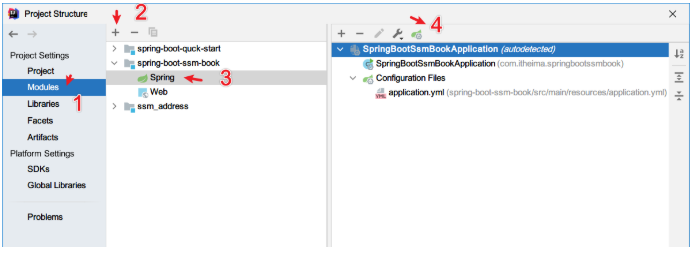
- 设置数据源参数
# 数据源的配置,可以指定为druid的连接池
spring:
  datasource:
    driver-class-name: com.mysql.jdbc.Driver
    username: root
    password: root
    url: jdbc:mysql:///ssm_db
    type: com.alibaba.druid.pool.DruidDataSource

# 显示sql语句
mybatis:
  configuration:
    log-impl: org.apache.ibatis.logging.stdout.StdOutImpl
2
3
4
5
6
7
8
9
10
11
12
13
注意事项:SpringBoot版本低于2.4.3(不含),Mysql驱动版本大于8.0时,需要在url连接串中配置时区
jdbc:mysql://localhost:3306/ssm_db?serverTimezone=UTC或在MySQL数据库端配置时区解决此问题
- 接口上添加**@Mapper**
@Mapper
public interface BookDao {
    @Select("select * from tbl_book where id=#{id}")
    Book getById(Integer id);
}
2
3
4
5
- 注解另一种做法:在SpringBoot的启动类上使用@MapperScan("com.itheima.dao")注解,做一次就可以了
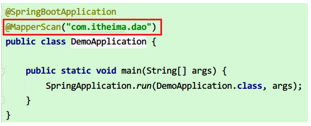
- 测试类中注入dao接口,测试功能。如果bookDao下有红线,如果能正常执行,则忽略。
@SpringBootTest
class SpringBootMybatisApplicationTest {
    @Autowired
    private BookDao bookDao;

    @Test
    public void testGetById() {
        Book book = bookDao.getById(1);
        System.out.println(book);
    }
}
2
3
4
5
6
7
8
9
10
11
# Springboot开启多线程
1,使用@EnableAsync开启异步任务
A,编写线程池配置类:
package top.jztice5.mq.config;

import org.springframework.context.annotation.Bean;
import org.springframework.context.annotation.Configuration;
import org.springframework.scheduling.annotation.EnableAsync;
import org.springframework.scheduling.concurrent.ThreadPoolTaskExecutor;

import java.util.concurrent.ThreadPoolExecutor;

/**
* @author Jztice5
* @date 2022年05月09日 20:13
*/

@Configuration
//开启异步任务
@EnableAsync
public class ThreadConfig {

    @Bean
    public ThreadPoolTaskExecutor taskExecutor() {

        ThreadPoolTaskExecutor tptx = new ThreadPoolTaskExecutor();

        //配置核心线程数;
        tptx.setCorePoolSize(15);
        //设置最大线程数
        tptx.setMaxPoolSize(30);
        //配置队列大小
        tptx.setQueueCapacity(1000);
        //线程的名称前缀
        tptx.setThreadNamePrefix("executor-");
        //线程活跃时间
        tptx.setKeepAliveSeconds(30);
        //等待所有任务结束后关闭线程池;
        tptx.setWaitForTasksToCompleteOnShutdown(true);
        //设置拒绝策略
        tptx.setRejectedExecutionHandler(new ThreadPoolExecutor.CallerRunsPolicy());
        //执行初始化
        tptx.initialize();

        return tptx;

    }

}
2
3
4
5
6
7
8
9
10
11
12
13
14
15
16
17
18
19
20
21
22
23
24
25
26
27
28
29
30
31
32
33
34
35
36
37
38
39
40
41
42
43
44
45
46
47
B,在要启用多线程的方法上面添加@ASync注解:
@ASync添加任务到线程池;
package top.jztice5.mq.listener;

import org.springframework.amqp.rabbit.annotation.RabbitListener;
import org.springframework.scheduling.annotation.Async;
import org.springframework.stereotype.Component;

import java.time.LocalTime;

/**
 * @author Jztice5
 * @date 2022年05月09日 16:23
 */

//让boot程序识别为bean对象
@Component
public class SpringRabbitListener {

    long startTime = System.currentTimeMillis();

    //添加任务到线程池
    @Async
    //声明目标队列名称
    @RabbitListener (queues = "simple.queue")
    public void setTextWork1Consumer (String msg) throws InterruptedException {

        System.out.println("消费者A = " + msg +"---"+ LocalTime.now());
        Thread.sleep(20);
    }

    @Async
    //声明目标队列名称
    @RabbitListener (queues = "simple.queue")
    public void setTextWork2Consumer (String msg) throws InterruptedException {

        System.err.println("消费者B = " + msg +"---"+ LocalTime.now());
        Thread.sleep(200);

    }

    long EndTime = System.currentTimeMillis();
    Long time = EndTime - startTime;


}
2
3
4
5
6
7
8
9
10
11
12
13
14
15
16
17
18
19
20
21
22
23
24
25
26
27
28
29
30
31
32
33
34
35
36
37
38
39
40
41
42
43
44
45
# 依赖汇总
<!--父依赖-->
<parent>
  <groupId>org.springframework.boot</groupId>
  <artifactId>spring-boot-starter-parent</artifactId>
  <version>2.2.10.RELEASE</version>
</parent>

<!--Mysql依赖包-->
<dependency>
  <groupId>mysql</groupId>
  <artifactId>mysql-connector-java</artifactId>
  <version>5.1.46</version>
  <scope>runtime</scope>
</dependency>

<!-- mybatis启动器 -->
<dependency>
  <groupId>org.mybatis.spring.boot</groupId>
  <artifactId>mybatis-spring-boot-starter</artifactId>
</dependency>

<!-- druid数据源驱动 -->
<dependency>
  <groupId>com.alibaba</groupId>
  <artifactId>druid-spring-boot-starter</artifactId>
  <version>1.1.24</version>
</dependency>

<!--springmvc的启动器-->
<dependency>
  <groupId>org.springframework.boot</groupId>
  <artifactId>spring-boot-starter-web</artifactId>
</dependency>

<!--Spring boot Junit测试-->
<dependency>
  <groupId>org.springframework.boot</groupId>
  <artifactId>spring-boot-starter-test</artifactId>
  <scope>test</scope>
  <exclusions>
    <exclusion>
      <groupId>org.junit.vintage</groupId>
      <artifactId>junit-vintage-engine</artifactId>
    </exclusion>
  </exclusions>
</dependency>

<!--AOP-->
<dependency>
  <groupId>org.springframework.boot</groupId>
  <artifactId>spring-boot-starter-aop</artifactId>
</dependency>

<!--lombok插件-->
<dependency>
  <groupId>org.projectlombok</groupId>
  <artifactId>lombok</artifactId>
  <optional>true</optional>
</dependency>

<!-- fastjson -->
<dependency>
  <groupId>com.alibaba</groupId>
  <artifactId>fastjson</artifactId>
</dependency>

<!--json转换器-->
<dependency>
  <groupId>com.alibaba</groupId>
  <artifactId>fastjson</artifactId>
  <version>1.2.76</version>
</dependency>

<!--字符串工具类-->
<dependency>
  <groupId>commons-lang</groupId>
  <artifactId>commons-lang</artifactId>
  <version>2.6</version>
</dependency>

<!--PageHelper分页插件-->
<dependency>
    <groupId>com.github.pagehelper</groupId>
    <artifactId>pagehelper-spring-boot-starter</artifactId>
    <version>1.4.0</version>
</dependency>

<!--阿里云发短信-->
<dependency>
    <groupId>com.aliyun</groupId>
    <artifactId>aliyun-java-sdk-core</artifactId>
    <version>4.5.16</version>
</dependency>
<dependency>
    <groupId>com.aliyun</groupId>
    <artifactId>aliyun-java-sdk-dysmsapi</artifactId>
    <version>2.1.0</version>
</dependency>

<!-- hutool 工具类-->
<dependency>
    <groupId>cn.hutool</groupId>
    <artifactId>hutool-all</artifactId>
    <version>5.7.6</version>
</dependency>

<!--只导入起步依赖,redis是没有使用连接池的-->
<dependency>
    <groupId>org.springframework.boot</groupId>
    <artifactId>spring-boot-starter-data-redis</artifactId>
</dependency>

<!--导入Redis连接池的支持-->
<dependency>
    <groupId>org.apache.commons</groupId>
    <artifactId>commons-pool2</artifactId>
</dependency>

<!--spring基于注解的缓存起步依赖-->
<dependency>
    <groupId>org.springframework.boot</groupId>
    <artifactId>spring-boot-starter-cache</artifactId>
</dependency>
2
3
4
5
6
7
8
9
10
11
12
13
14
15
16
17
18
19
20
21
22
23
24
25
26
27
28
29
30
31
32
33
34
35
36
37
38
39
40
41
42
43
44
45
46
47
48
49
50
51
52
53
54
55
56
57
58
59
60
61
62
63
64
65
66
67
68
69
70
71
72
73
74
75
76
77
78
79
80
81
82
83
84
85
86
87
88
89
90
91
92
93
94
95
96
97
98
99
100
101
102
103
104
105
106
107
108
109
110
111
112
113
114
115
116
117
118
119
120
121
122
123