
 IO流
IO流
流体系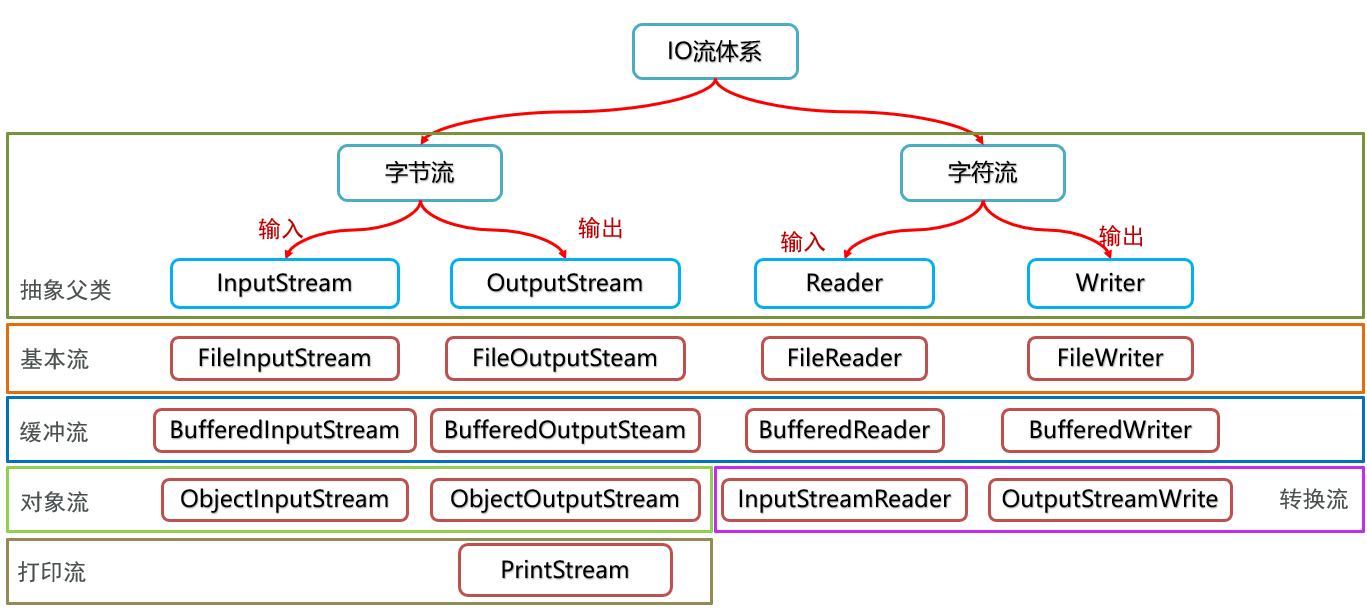
# IO流
作用:将数据写到文件中,实现数据永久化存储,读取文件中的数据到程序
按数据类型分
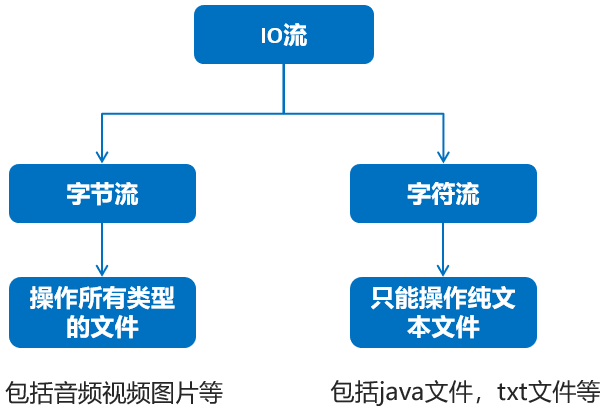
纯文本文件: 用windows记事本打开能读的懂,就是纯文本文件。
IO流体系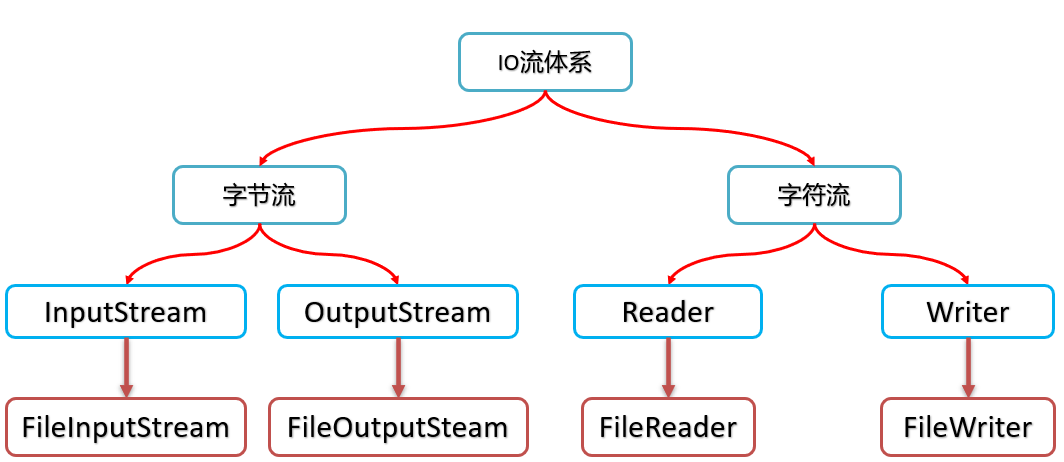
流对象共性常用方法
| 方法 | 说明 |
|---|---|
| void close() | 关闭流对象 |
# FileOutputStream
常用构造
| 方法 | 说明 |
|---|---|
| FileOutputStream(String name) | 创建流对象绑定路径 |
| FileOutputStream(String name,boolean append) | append为true, 以追加的形式写数据到文件 |
常用方法
| 方法 | 说明 |
|---|---|
| void write(int b) | 一次写一个字节数据 |
| void write(byte[] b) | 一次写一个字节数组数据 |
| void write(byte[] b, int off, int len) | 一次写一个字节数组的部分数据(从off到len) |
示例:
public static void main(String[] args) throws IOException {
    FileOutputStream fos = new FileOutputStream("study_day11\\abc\\2.txt");

    byte[] bs = new byte[] {65, 66, 67, 68, 69};
    // void write(byte[] b) 将byte数组写入流中
    fos.write(bs);

    // void write(byte[] b, int off, int len) 将byte数组的一部分写入流中
    // int off: 从哪个索引开始
    // int len: 写几个
    fos.write(bs, 2, 3);

    fos.close();
}
2
3
4
5
6
7
8
9
10
11
12
13
14
# FileInputStream
常用构造
| 方法 | 说明 |
|---|---|
| FileInputStream(String name) | 创建流对象绑定路径 |
| FileInputStream(String name,boolean append) | append为true, 以追加的形式写数据到文件 |
常用方法
| 方法 | 说明 |
|---|---|
| int read() | 从流中读取一个字节 |
| int read(byte[] b) | 从流中读取多个字节保存参数的数组中 |
String转成byte
| 方法名 | 说明 |
|---|---|
| byte[] getBytes() | 将String的内容转成byte[] |
byte转成String
| 方法名 | 说明 |
|---|---|
| String(byte bytes[]) | 将byte[]的内容转成String |
| String(byte bytes[], int offset, int length) | 将byte[]的部分内容转成String |
示例:
public static void main(String[] args) throws IOException {
    // 1.创建IO流
    FileInputStream fis = new FileInputStream("study_day11\\abc\\3.txt");
    // 定义一个变量保存每次读取到的数据
    int b;
    // fis.read(): 读取文件中的内容
    // b = fis.read(): 将读取的内容保存到变量b中
    // (b = fis.read()) != -1: 判断变量b的值是否为-1
    while ((b = fis.read()) != -1) {
        // 读取到内容
        System.out.println((char) b);
    }
    // 3.关闭
    fis.close();
}
2
3
4
5
6
7
8
9
10
11
12
13
14
15
public static void main(String[] args) throws IOException {
    FileInputStream fis = new FileInputStream("study_day11\\abc\\3.txt");
    // 定义数组保存读取的内容 数组的长度实际应该写1024的整数倍,建议写1024 * 8
    byte[] buf = new byte[4];
    // 定义一个变量保存读取的数量
    int len;
    while ((len = fis.read(buf)) != -1) {
        // 读取到内容
        System.out.println(new String(buf, 0, len));
    }
    fis.close();
}
2
3
4
5
6
7
8
9
10
11
12
# FileReader
常用构造
| 方法 | 说明 |
|---|---|
| FileReader(String name) | 创建流对象绑定路径 |
| FileReader(String name,boolean append) | append为true, 以追加的形式写数据到文件 |
常用方法
| 方法 | 说明 |
|---|---|
| int read() | 从流中读取一个字节 |
| int read(char[] b) | 从流中读取多个字节保存参数的数组中 |
示例:
// int read(char[] cbuf) 读取多个字符
public static void test02() throws IOException {
    FileReader fr = new FileReader("study_day11\\abc\\4.txt");

    // 定义数组保存读取的内容
    char[] chs = new char[3];
    // 定义变量保存读取的数量
    int len;

    while ((len = fr.read(chs)) != -1) {
        System.out.println(new String(chs, 0 , len));
    }

    fr.close();
}
2
3
4
5
6
7
8
9
10
11
12
13
14
15
# FileWriter
常用构造
| 方法 | 说明 |
|---|---|
| Filewriter(String name) | 创建流对象绑定路径 |
| FileWriter(String name,boolean append) | append为true, 以追加的形式写数据到文件 |
常用方法
| 方法 | 说明 |
|---|---|
| void write(int c) | 写一个字符到流中 |
| void write(char[] cbuf) | 写入一个字符数组到流中 |
| void write(char[] cbuf, int off, int len) | 写入字符数组的一部分到流中 |
| void write(String str) | 写一个字符串到流中 |
| void write(String str, int off, int len) | 写一个字符串的一部分到流中 |
换行符:windows: \r\n linux: \n mac: \r
示例:fw.write("\r\n");
相关API:System.getProperty("line.separator")获取当前操作系统的换行符
注意:字节流和字符流写入文件的细节
字节流写入数据是直接写入的,因为文件接收的就是字节数据;而字符流写入数据不会直接写入,会将字符流数据临时存放在流中的缓冲区,需要等待一个flush()操作将缓冲区的字符数据转换成字节数据才会写入到文件中,而字符流调用close()方法实际上会自动调用一次flush()方法。
# IO异常处理
JDK1.7以前的IO异常处理
public static void test01() {
    FileWriter fw = null;
    try {
        fw = new FileWriter("study_day12\\abc\\1.txt");
        fw.write("abc");
    } catch (IOException e) {
        e.printStackTrace();
    } finally {
        // 当路径无效时fw对象有可能会是null
        if (fw != null) {
            try {
                fw.close();
            } catch (IOException e) {
                e.printStackTrace();
            }
        }
    }
}
2
3
4
5
6
7
8
9
10
11
12
13
14
15
16
17
18
JDK1.7以后增加 try-with-resource 语句来处理资源,该语句确保了每个资源在语句结束时关闭。
try (创建流的代码) {
    其他代码;
} catch (IOException e) {
    处理异常的代码
}
2
3
4
5
注: IDEA可以通过在创建流语句.twr快捷创建,如new FileWriter("study_day12\\abc\\1.txt").twr
示例:
public static void test02() {
    // 类实现了AutoCloseable接口就能放到try的()中,就会自动关流
    try (
            FileWriter fw = new FileWriter("study_day12\\abc\\1.txt");
            FileReader fr = new FileReader("study_day12\\abc\\2.txt");
    ) {
        fw.write("aaa");
    } catch (IOException e) {
        System.out.println("处理了IO流异常!");
    }
}
2
3
4
5
6
7
8
9
10
11
注意: 只有实现了AutoCloseable接口的对象才能写在try后面的括号里
# 缓冲流
概述
缓冲流是对4个基本的 FileXxx 流的增强,也是四个流。
按照数据类型分类:
- 字节缓冲流: BufferedInputStream , BufferedOutputStream
- 字符缓冲流: BufferedReader , BufferedWriter
原理:在创建流对象时,会创建一个内置的默认8K大小的缓冲区数组,一次性读8K的数据进入到缓冲区数组,然后通过缓冲区读写,减少系统IO次数,从而提高读写的效率。
文件复制案例与普通流的比较:
以字节流为例,一次读取一个字节,缓冲流是先从文件中一次性读8K数据到内存中的缓冲区数组中,字节流再从这个数组中一次读一个字节到输出流的缓冲区数组,直到缓冲区数组的8K容量满了后,才会输出到文件中。这与使用字节流一次读一个8K字节数组的效果相似。
但是使用字节流一次读取一个8K字节数组的话,缓冲流的文件复制效率要略低一点,原因是因为缓冲流需要先将数据存放到内存中的缓冲区数组,然后再由字节流将这8K的数组读取到输出流的缓冲数组中,再由缓冲输出流输出到文件,这样等于是进行了文件→缓冲区→内存→缓冲区→文件的操作,而直接使用使用字节流一次读取一个8K字节数组只需要进行文件→内存→文件的操作,数据复制或者说移动的次数要少,所以相对的效率会略高些。
体系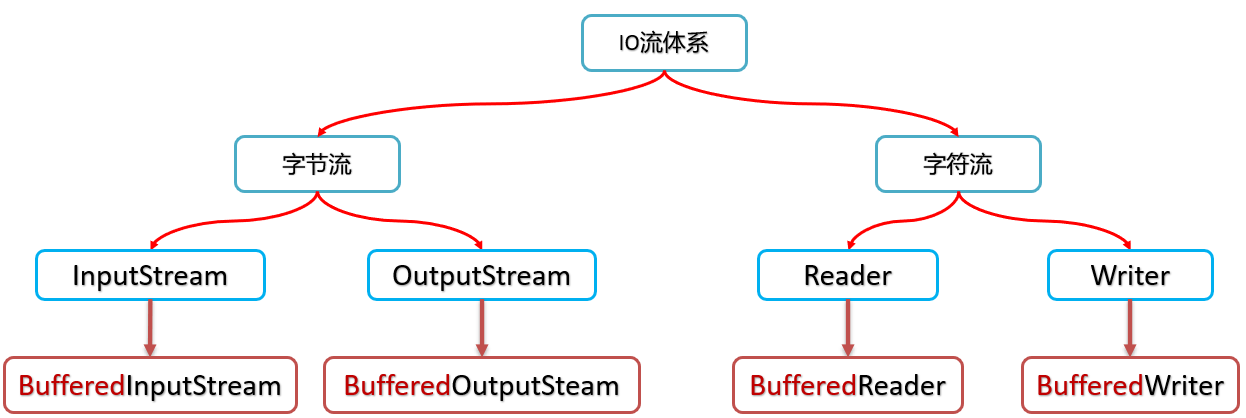
# 字节缓冲流
常用构造
| 方法 | 说明 |
|---|---|
| public BufferedInputStream(InputStream in) | 把基本的字节输入流包装成一个字节输入缓冲流,从而提高字节输入流读数据的性能 |
| public BufferedOutputStream(OutputStream out) | 把基本的字节输出流包装成一个字节输出缓冲流,从而提高写数据的性能 |
注: 常用方法与基本字节流一致
效率分析:
- 读写单个字节时,建议使用缓冲流(其实就是相当于读写字节数组)
- 读写一个字节数组时,建议使用基本流
# 字符缓冲流
常用构造
| 方法 | 说明 |
|---|---|
| public BufferedWriter(Writer r) | 把基本的字符输出流包装成一个字符输出缓冲流,从而提高字符输出流写数据的性能 |
| public BufferedReader(Reader r) | 把基本的字符输入流包装成一个字符输入缓冲流,从而提高字符输入流读数据的性能 |
新增方法
| 方法 | 说明 |
|---|---|
| public String newLine() | 换行 ** 字符缓冲输出流新增** |
| public String readLine() | 读取一行数据返回,如果读取没有完毕,无行可读返回null 字符缓冲输入流新增 |
# 转换流
字符集
ASCII字符集:常见字符集
ISO-8859-1字符集:单字节编码字符集,向下兼容ASCII
GBxxx字符集:汉字相关字符集
Unicode字符集:万国码
注意: IDEA读取默认使用UTF-8读取
转换流作用: 用于处理读取中文字符转码问题
InputStreamReader 指定编码读取数据
| 方法名 | 说明 |
|---|---|
| InputStreamReader(InputStream in) | 使用默认编码读取数据 |
| InputStreamReader(InputStream in, String charsetName) | 使用指定编码读取数据 |
OutputStreamWriter 指定编码写数据
| 方法名 | 说明 |
|---|---|
| OutputStreamWriter(OutputStream out) | 使用默认编码写数据 |
| OutputStreamWriter(OutputStream out, String charsetName) | 使用指定编码写数据 |
注意: 转换流继承字符流,可以使用字符流的方法
**扩展:**转换流可以充当字节流转换字符流的中介
例:
InputStream fis = new FileInputStream("Ex_Test\\TestFile\\a.txt");
InputStreamReader isr = new InputStreamReader(fis);
BufferedReader br = new BufferedReader(isr);
2
3
# 对象流
作用: 将对象序列化成字节数据存入文件以及读取文件中的对象
分两类
- ObjectOutputStream: 对象输出流
- ObjectInputStream: 对象输入流
ObjectOutputStream相关API
| 方法名 | 说明 |
|---|---|
| ObjectOutputStream(OutputStream out) | 对象输出流,把对象以字节的形式写到文件 |
| public void writeObject(Object obj) | 写一个对象到文件中 |
ObjectInputStream相关API
| 方法名 | 说明 |
|---|---|
| ObjectInputStream(InputStream in) | 对象输入流,把写到文件中的对象读到程序中 |
| public Object readObject() | 读取文件中的对象 |
注意:
对象要序列化到文件,这个类需要实现Serializable接口
如果一个类的某个成员变量不想被序列化,也就是不想被保存,则可以加上transient关键字
# 打印流
作用: 打印流可以实现方便、高效的打印数据到文件中去,可以实现原样打印。
**分类:**PrintStream(一般使用这个),PrintWriter
常用构造
| 方法名 | 说明 |
|---|---|
| PrintStream(File file) | 创建PrintStream, 指定打印的目的地 |
| PrintStream(String fileName) | 创建PrintStream, 指定打印的目的地 |
| PrintStream(OutputStream out) | 创建PrintStream, 指定打印的目的地 |
常用方法
| 方法名 | 说明 |
|---|---|
| print(Xxx x) | 打印数据, 不换行 |
| println(Xxx x) | 打印数据, 换行 |
注意:
平时使用的System.out.println()也是使用的打印流,其中的 **out **就是一个打印流对象,可以通过System.setOut(PrintStream p)方法控制打印的路径,默认是输出到控制台
# 字符流缓存区
StringWriter 不需要传入文件地址,可以当做缓存区使用。
# commons-io工具包
commons-io是apache开源基金组织提供的一组有关IO操作的类库,可以挺提高IO功能开发的效率。
commons-io工具包提供了很多有关io操作的类。有两个主要的类FileUtils, IOUtils
FileUtils常用方法
| 方法 | 说明 |
|---|---|
| String readFileToString(File file, String encoding) | 读取文件中的数据, 返回字符串 |
| void copyFile(File srcFile, File destFile) | 复制文件。(目标文件,目的地) |
| void copyDirectoryToDirectory(File srcDir, File destDir) | 复制文件夹。(目标文件夹,目的地) |
注: FileUtils还有很多方法都是用于操作文件和文件夹的,几乎涵盖了所有能在图形界面上能进行的操作
IOUtils常用方法
| 方法 | 说明 |
|---|---|
| toInputStream(String input, String encoding) | 通过文本获取输入流 , 可以指定编码格式 |
| IOUtils.toBufferedInputStream(InputStream input, int size) | 获取一个指定缓冲流的大小的输入流 |
| IOUtils.buffer(基本流) | 获取缓冲流 |
| IOUtils.readLines(基本流) | 读一行数据 |
| IOUtils.read(基本流, byte[] buffer) | 读取数据至字节数组 |
| IOUtils.writeLines(字符串集合,基本流,编码类型) | 写一行数据 |
| IOUtils.write(byte[] data, 基本流) | 写字节数组 |