
 如何写一个Redis会话客户端
# Redis RESP协议
Redis是一个CS架构的软件,通信一般分两步(不包括pipeline和PubSub):
- 客户端(client)向服务端(server)发送一条命令
- 服务端解析并执行命令,返回响应结果给客户端
因此客户端发送命令的格式、服务端响应结果的格式必须有一个规范,这个规范就是通信协议。
而在Redis中采用的是RESP(Redis Serialization Protocol)协议:
- Redis 1.2版本引入了RESP协议
- Redis 2.0版本中成为与Redis服务端通信的标准,称为RESP2
- Redis 6.0版本中,从RESP2升级到了RESP3协议,增加了更多数据类型并且支持6.0的新特性--客户端缓存
但目前,默认使用的依然是RESP2协议,以下简称RESP。
在RESP中,通过首字节的字符来区分不同数据类型,常用的数据类型包括5种:
- 单行字符串:首字节是
+,后面跟上单行字符串,以CRLF( "\r\n" )结尾。例如返回"OK": "+OK\r\n" - 错误(Errors):首字节是
-,与单行字符串格式一样,只是字符串是异常信息,例如:"-Error message\r\n" - 数值:首字节是
:,后面跟上数字格式的字符串,以CRLF结尾。例如:":10\r\n" - 多行字符串:首字节是
$,表示二进制安全的字符串,最大支持512MB:- 如果大小为0,则代表空字符串:"$0\r\n\r\n"
- 如果大小为-1,则代表不存在:"$-1\r\n"
- 数组:首字节是
*,后面跟上数组元素个数,再跟上元素,元素数据类型不限
# 手写Redis客户端
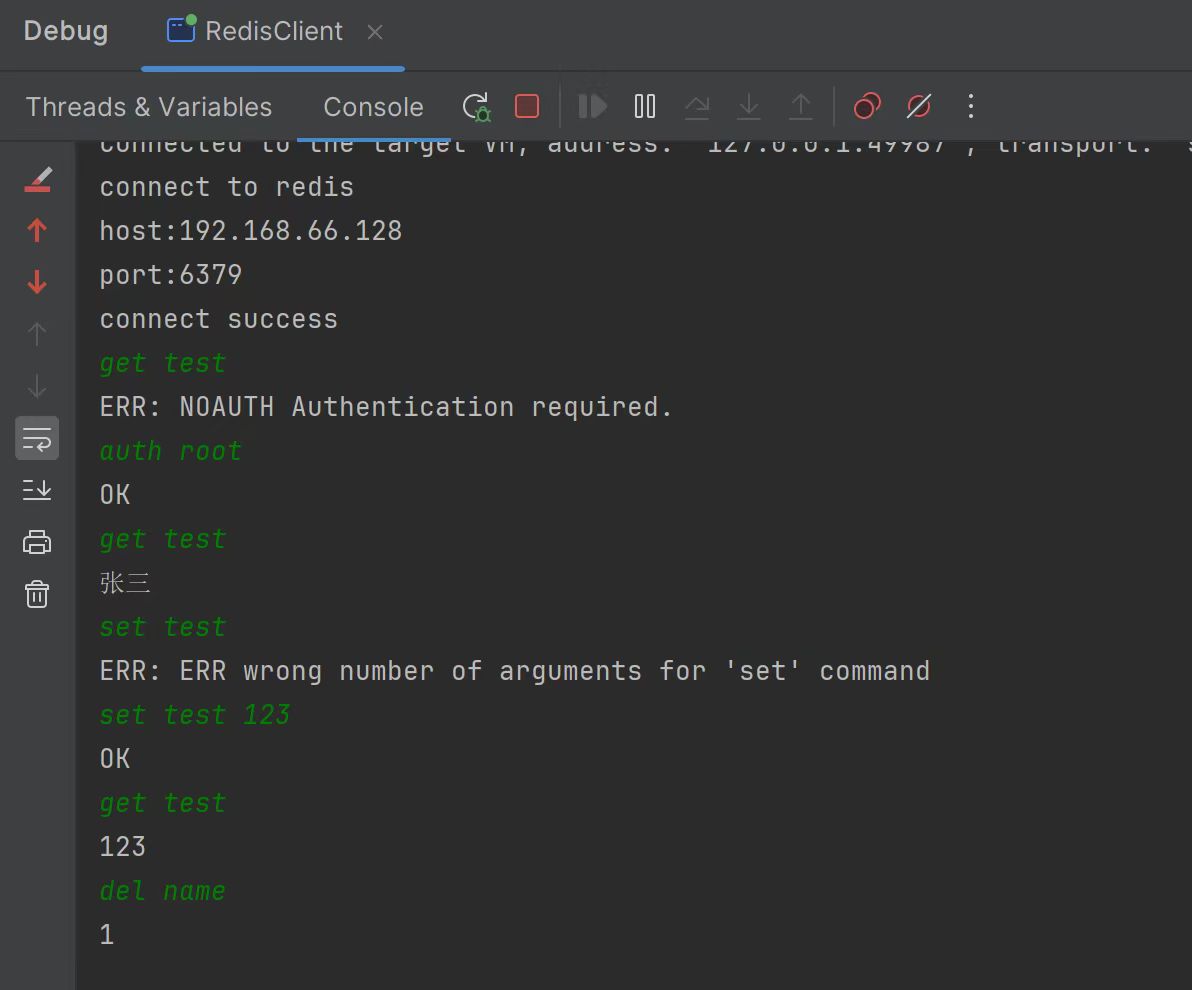
所以我们只要遵循RESP协议就能跟Redis进行会话了,下面是一个示例:
效果
代码
import java.io.*;
import java.net.Socket;
import java.nio.charset.StandardCharsets;
import java.util.ArrayList;
import java.util.Arrays;
import java.util.List;
import java.util.Scanner;
import java.util.stream.Collectors;

/**
 * @author kinoko
 */
public class RedisClient {

    static Scanner sc = new Scanner(System.in);
    static String host = "192.168.66.128";
    static int port = 6379;
    static Socket socket;
    static PrintWriter writer;
    static BufferedInputStream reader;
    static StringBuilder replyBuf = new StringBuilder();

    public static void main(String[] args) throws IOException {
        try {
            // 建立连接
            connectToRedis();
            // 通信
            communicateToRedis();
        } catch (IOException e) {
            throw new RuntimeException(e);
        } finally {
            if (writer != null) {
                writer.close();
            }
            if (reader != null) {
                reader.close();
            }
            if (socket != null) {
                socket.close();
            }
        }
    }

    private static void communicateToRedis() throws IOException {
        String command;
        while (true) {
            command = sc.nextLine();
            if ("exit".equals(command)) {
                break;
            }
            // 发出请求
            sendRequest(command);
            // 解析响应
            System.out.println(handleResponse());
        }
    }

    private static Object handleResponse() throws IOException {
        // 获取响应首字符判断响应类型
        int prefix = reader.read();
        switch (prefix) {
            case RESP_DATA_TYPE.STR: // 字符类型
                return readLine();
            case RESP_DATA_TYPE.ERR: // 异常类型
                return "ERR: " + readLine();
            case RESP_DATA_TYPE.INT: // 数字类型
                return readInt();
            case RESP_DATA_TYPE.BULK_STR: // 多行字符类型
                return readBulkString();
            case RESP_DATA_TYPE.ARRAY: // 数组类型
                return readArray();
            default:
                throw new RuntimeException("Invalid RESP data");
        }
    }

    private static Object readArray() throws IOException {
        // 获取数组大小
        int len = Integer.parseInt(readLine());
        if (len <= 0) {
            return null;
        }
        // 定义集合,接收多个元素
        List<Object> list = new ArrayList<>(len);
        // 遍历,依次读取每个元素
        for (int i = 0; i < len; i++) {
            list.add(handleResponse());
        }
        return list;
    }

    private static Object readBulkString() throws IOException {
        // 因为已经把表示数据类型的首字符读了,所以这里读的是字符长度
        // $5\r\nhello\r\n -> hello\r\n
        int len = Integer.parseInt(readLine());
        if (len == -1) {
            return null;
        }
        if (len == 0) {
            return "";
        }
        // 读取数据
        // hello\r\n -> \r\n
        byte[] buffer = new byte[len];
        reader.read(buffer);

        // 跳过\r\n
        reader.read();
        reader.read();
        return new String(buffer, StandardCharsets.UTF_8);
    }

    private static Long readInt() throws IOException {
        return Long.parseLong(readLine());
    }

    private static String readLine() throws IOException {
        // 清空响应缓冲区
        replyBuf.setLength(0);
        int c;
        while ((c = reader.read()) != '\r') {
            replyBuf.append(((char) c));
        }
        // 跳过\n
        reader.read();
        return replyBuf.toString();
    }


    /**
     * 发出请求
     * 统一使用多行字符数组的格式发送:
     * set key value -> *3\r\n
     * $3\r\nset\r\n
     * $3\r\nkey\r\n
     * $5\r\nvalue\r\n
     *
     * @param command 命令
     */
    private static void sendRequest(String command) {
        // 根据空格切割命令
        List<String> args = Arrays.stream(command.split("\\u0020"))
                // 过滤空格
                .filter(s -> !s.isEmpty()).collect(Collectors.toList());
        // 写入指令,先拼接字符串,防止char转int导致命令拼接错误
        writer.println("" + RESP_DATA_TYPE.ARRAY + args.size());
        for (String arg : args) {
            writer.println("" + RESP_DATA_TYPE.BULK_STR + arg.getBytes(StandardCharsets.UTF_8).length);
            writer.println(arg);
        }
        writer.flush();
    }


    private static void connectToRedis() throws IOException {
        System.out.println("connect to redis");
        System.out.print("host:");
        if (host == null) {
            host = sc.nextLine();
        } else {
            System.out.println(host);
        }
        System.out.print("port:");
        if (port == 0) {
            port = Integer.parseInt(sc.nextLine());
        } else {
            System.out.println(port);
        }
        // 创建socket
        socket = new Socket(host, port);
        // 获取输出流输入流
        writer = new PrintWriter(new OutputStreamWriter(socket.getOutputStream(), StandardCharsets.UTF_8));
        reader = new BufferedInputStream(socket.getInputStream());
        System.out.println("connect success");
    }

    interface RESP_DATA_TYPE {
        char STR = '+';
        char ERR = '-';
        char INT = ':';
        char BULK_STR = '$';
        char ARRAY = '*';
    }

}
1
2
3
4
5
6
7
8
9
10
11
12
13
14
15
16
17
18
19
20
21
22
23
24
25
26
27
28
29
30
31
32
33
34
35
36
37
38
39
40
41
42
43
44
45
46
47
48
49
50
51
52
53
54
55
56
57
58
59
60
61
62
63
64
65
66
67
68
69
70
71
72
73
74
75
76
77
78
79
80
81
82
83
84
85
86
87
88
89
90
91
92
93
94
95
96
97
98
99
100
101
102
103
104
105
106
107
108
109
110
111
112
113
114
115
116
117
118
119
120
121
122
123
124
125
126
127
128
129
130
131
132
133
134
135
136
137
138
139
140
141
142
143
144
145
146
147
148
149
150
151
152
153
154
155
156
157
158
159
160
161
162
163
164
165
166
167
168
169
170
171
172
173
174
175
176
177
178
179
180
181
182
183
184
185
2
3
4
5
6
7
8
9
10
11
12
13
14
15
16
17
18
19
20
21
22
23
24
25
26
27
28
29
30
31
32
33
34
35
36
37
38
39
40
41
42
43
44
45
46
47
48
49
50
51
52
53
54
55
56
57
58
59
60
61
62
63
64
65
66
67
68
69
70
71
72
73
74
75
76
77
78
79
80
81
82
83
84
85
86
87
88
89
90
91
92
93
94
95
96
97
98
99
100
101
102
103
104
105
106
107
108
109
110
111
112
113
114
115
116
117
118
119
120
121
122
123
124
125
126
127
128
129
130
131
132
133
134
135
136
137
138
139
140
141
142
143
144
145
146
147
148
149
150
151
152
153
154
155
156
157
158
159
160
161
162
163
164
165
166
167
168
169
170
171
172
173
174
175
176
177
178
179
180
181
182
183
184
185
上次更新: 2024/02/17 13:37:45