
 签到功能方案
# 前言
签到功能无需多言了,本文来讨论一下关于签到功能比较实用的实现方案。
# 表设计
我们先大概设计一张表:
create table user_sign
(
  sid       bigint unsigned auto_increment comment '主键id'
  primary key,
  uid       bigint unsigned     not null comment '用户id',
  date      date                not null comment '日期',
  is_makeup tinyint(1) unsigned not null comment '是否补签'
);
2
3
4
5
6
7
8
很简单的字段,能够实现基本功能,但是不方便我们后续统计,如果要统计用户年月日的一个签到情况,函数计算会导致索引失效,所以我们改进一下,将年月抽取出来做冗余字段方便建立索引:
create table user_sign
(
  sid       bigint unsigned auto_increment comment '主键id'
  primary key,
  uid       bigint unsigned     not null comment '用户id',
  year      year                not null comment '年份',
  month     tinyint(2) unsigned not null comment '月份',
  date      date                not null comment '日期',
  is_makeup tinyint(1) unsigned not null comment '是否补签'
);
2
3
4
5
6
7
8
9
10
但是这样也存在问题,假如,我们的用户量有10w,平均每日签到数为1w,相当于每天都会增加1w条记录,每条记录占8(sid) + 8(uid) + 1(year) + 1(month) + 3(date) + 1(is_makeup) = 22字节,也就是一天会占22w字节,所以这样的表设计是很消耗内存的,于是就到我们bitmap出场了:
create table user_sign
(
    sid       bigint unsigned auto_increment comment '主键id'
        primary key,
    uid       bigint unsigned     not null comment '用户id',
    year      year                not null comment '年份',
    month     tinyint(2) unsigned not null comment '月份',
    date      varchar(31)         not null comment '日期(位图)',
    is_makeup varchar(31) 				null comment '是否补签'
);
2
3
4
5
6
7
8
9
10
众所周知bitmap的特点就是内存压缩,通过二进制位来表示一个月内的签到情况,一个月最多31天,所以使用varchar(31)来存储,31位分别对应每一天的签到情况,同样补签状态也是。
像这样一条记录就是2024/01/02、2024/01/03签到了。
# bitmap的计算
对于bitmap的计算我们可以使用Redis中的BitMap相关操作指令来实现,或者通过程序计算。
# Redis
BitMap的操作命令有:
- SETBIT:向指定位置(offset)存入一个0或1
- GETBIT :获取指定位置(offset)的bit值
- BITCOUNT :统计BitMap中值为1的bit位的数量
- BITFIELD :操作(查询、修改、自增)BitMap中bit数组中的指定位置(offset)的值
- BITFIELD_RO :获取BitMap中bit数组,并以十进制形式返回
- BITOP :将多个BitMap的结果做位运算(与 、或、异或)
- BITPOS :查找bit数组中指定范围内第一个0或1出现的位置
示例
@Override
public Result sign() {
    // 1.获取当前登录用户
    Long userId = UserHolder.getUser().getId();
    // 2.获取日期
    LocalDateTime now = LocalDateTime.now();
    // 3.拼接key
    String keySuffix = now.format(DateTimeFormatter.ofPattern(":yyyyMM"));
    String key = USER_SIGN_KEY + userId + keySuffix;
    // 4.获取今天是本月的第几天
    int dayOfMonth = now.getDayOfMonth();
    // 5.写入Redis SETBIT key offset 1
    stringRedisTemplate.opsForValue().setBit(key, dayOfMonth - 1, true);
    return Result.ok();
}
2
3
4
5
6
7
8
9
10
11
12
13
14
15
# Java工具类
工具类
public class BitMap {

    private final StringBuilder bitmap;
    private static final char ZERO_BIT = '0';
    private static final char ONE_BIT = '1';

    public BitMap(String bitmap) {
        this.bitmap = new StringBuilder(bitmap);
    }

    public BitMap(int size) {
        this.bitmap = build(size);
    }

    /**
     * 构建一个长度为size的二进制字符串
     * @param size 长度
     * @return 二进制字符串
     */
    public static StringBuilder build(int size) {
        StringBuilder builder = new StringBuilder();
        IntStream.range(0, size).forEach(value -> builder.append(ZERO_BIT));
        return builder;
    }

    /**
     * 构建一个长度为size的二进制字符串
     * @param size 长度
     * @return bitmap
     */
    public static BitMap builder(int size) {
        return new BitMap(size);
    }

    /**
     * 构建一个长度为size的二进制字符串
     * @param bitmap 二进制字符串
     * @return bitmap
     */
    public static BitMap builder(String bitmap) {
        return new BitMap(bitmap);
    }

    /**
     * 设置一个二进制位
     * @param bitmap 二进制字符串
     * @param offset 位偏移量,从0开始
     * @param stat 是否
     * @return 二进制字符串
     */
    public static StringBuilder set(String bitmap, int offset, boolean stat) {
        if (bitmap == null || bitmap.isEmpty()) {
            return null;
        }
        StringBuilder builder = new StringBuilder(bitmap);
        return set(builder, offset, stat);
    }

    /**
     * 设置一个二进制位
     * @param bitmap 二进制字符串
     * @param offset 位偏移量,从0开始
     * @param stat 是否
     * @return 二进制字符串
     */
    public static StringBuilder set(StringBuilder bitmap, int offset, boolean stat) {
        if (bitmap == null) {
            return null;
        }
        // 如果偏移量大于长度,则补0
        if (offset + 1 > bitmap.length()) {
            IntStream.range(0, offset + 1 - bitmap.length()).forEach(value -> bitmap.append(ZERO_BIT));
        }
        bitmap.setCharAt(offset, toBit(stat));
        return bitmap;
    }

    /**
     * 获取二进制位
     * @param bitmap 二进制字符串
     * @param offset 位偏移量,从0开始
     * @return 二进制位
     */
    public static String get(String bitmap, int offset) {
        if (bitmap == null || bitmap.isEmpty()) {
            return bitmap;
        }
        return String.valueOf(bitmap.charAt(offset));
    }

    /**
     * 获取二进制位
     * @param bitmap 二进制字符串
     * @param offset 位偏移量,从0开始
     * @return 二进制位
     */
    public static String get(StringBuilder bitmap, int offset) {
        if (bitmap == null) {
            return null;
        }
        return String.valueOf(bitmap.charAt(offset));
    }

    /**
     * 获取二进制位
     * @param bitmap 二进制字符串
     * @return 二进制位
     */
    public static String get(StringBuilder bitmap) {
        return bitmap.toString();
    }

    /**
     * 获取二进制位
     * @param offset 位偏移量,从0开始
     * @return 二进制位
     */
    public String get(int offset) {
        return get(bitmap, offset);
    }

    /**
     * 获取二进制位
     * @return 二进制位
     */
    public String get() {
        return get(bitmap);
    }

    /**
     * 判断是否存在二进制位
     * @param bitmap 二进制字符串
     * @param offset 位偏移量,从0开始
     * @param stat 0或1
     * @return 是否
     */
    public static boolean contains(String bitmap, int offset, boolean stat) {
        return String.valueOf(toBit(stat)).equals(get(bitmap, offset));
    }

    /**
     * 判断是否存在二进制位
     * @param bitmap 二进制字符串
     * @param stat 0或1
     * @return 是否
     */
    public static boolean contains(String bitmap, boolean stat) {
        return bitmap.contains(String.valueOf(toBit(stat)));
    }

    /**
     * 转换二进制位
     * @param stat 是否
     * @return 二进制位
     */
    private static char toBit(boolean stat) {
        return stat ? ONE_BIT : ZERO_BIT;
    }

    /**
     * 设置一个二进制位
     * @param offset 位偏移量,从0开始
     * @param stat 是否
     * @return 二进制字符串
     */
    public BitMap set(int offset, boolean stat) {
        set(bitmap, offset, stat);
        return this;
    }

    /**
     * 判断是否存在二进制位
     * @param offset 位偏移量,从0开始
     * @param stat 0或1
     * @return 是否
     */
    public boolean contains(int offset, boolean stat) {
        return contains(bitmap.toString(), offset, stat);
    }

    /**
     * 判断是否存在二进制位
     * @param stat 0或1
     * @return 是否
     */
    public boolean contains(boolean stat) {
        return contains(bitmap.toString(), stat);
    }

    /**
     * 获取二进制位第一次在二进制字符串中出现的位置
     * @param bitmap 二进制字符串
     * @param stat 0或1
     * @return 二进制位在二进制字符串中的位置
     */
    public static int getPosition(StringBuilder bitmap, boolean stat) {
        return bitmap.toString().indexOf(toBit(stat));
    }

    /**
     * 获取二进制位第一次在二进制字符串中出现的位置
     * @param bitmap 二进制字符串
     * @param stat 0或1
     * @return 二进制位在二进制字符串中的位置
     */
    public static int getPosition(String bitmap, boolean stat) {
        return bitmap.indexOf(toBit(stat));
    }

}
2
3
4
5
6
7
8
9
10
11
12
13
14
15
16
17
18
19
20
21
22
23
24
25
26
27
28
29
30
31
32
33
34
35
36
37
38
39
40
41
42
43
44
45
46
47
48
49
50
51
52
53
54
55
56
57
58
59
60
61
62
63
64
65
66
67
68
69
70
71
72
73
74
75
76
77
78
79
80
81
82
83
84
85
86
87
88
89
90
91
92
93
94
95
96
97
98
99
100
101
102
103
104
105
106
107
108
109
110
111
112
113
114
115
116
117
118
119
120
121
122
123
124
125
126
127
128
129
130
131
132
133
134
135
136
137
138
139
140
141
142
143
144
145
146
147
148
149
150
151
152
153
154
155
156
157
158
159
160
161
162
163
164
165
166
167
168
169
170
171
172
173
174
175
176
177
178
179
180
181
182
183
184
185
186
187
188
189
190
191
192
193
194
195
196
197
198
199
200
201
202
203
204
205
206
207
208
209
210
使用
public static void main(String[] args) {
    LocalDateTime now = LocalDateTime.now();
    // 获取今天是本月的第几天(2024/01/26)
    int day = now.getDayOfMonth();
    String bitmap = BitMap.builder(31).set(day - 1, true).get();
    System.out.println(bitmap);
}
2
3
4
5
6
7
打印
0000000000000000000000000100000
# 签到统计
# 连续签到天数
需求:从最后一次签到开始向前统计,直到遇到第一次未签到为止,计算总的签到次数,就是连续签到天数。
十进制数的统计方式,通过右移一位与1做与运算,为1则计数器+1,遇到0则停止:
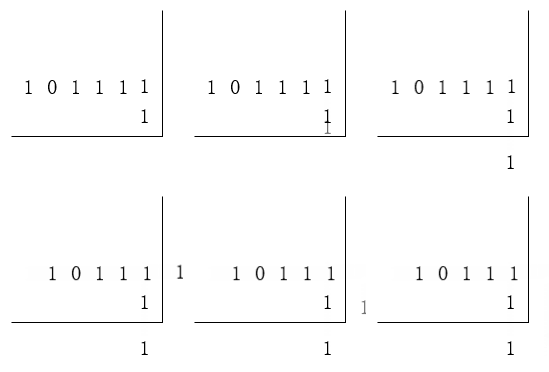
@Override
public Result signCount() {
    // 1.获取当前登录用户
    Long userId = UserHolder.getUser().getId();
    // 2.获取日期
    LocalDateTime now = LocalDateTime.now();
    // 3.拼接key
    String keySuffix = now.format(DateTimeFormatter.ofPattern(":yyyyMM"));
    String key = USER_SIGN_KEY + userId + keySuffix;
    // 4.获取今天是本月的第几天
    int dayOfMonth = now.getDayOfMonth();
    // 5.获取本月截止今天为止的所有的签到记录,返回的是一个十进制的数字 BITFIELD sign:5:202203 GET u14 0
    List<Long> result = stringRedisTemplate.opsForValue().bitField(
        key,
        BitFieldSubCommands.create()
        .get(BitFieldSubCommands.BitFieldType.unsigned(dayOfMonth)).valueAt(0)
    );
    if (result == null || result.isEmpty()) {
        // 没有任何签到结果
        return Result.ok(0);
    }
    Long num = result.get(0);
    if (num == null || num == 0) {
        return Result.ok(0);
    }
    // 6.循环遍历
    int count = countNumberOfOnesInBinary(num);
    return Result.ok(count);
}

/**
* 计算二进制中1的个数
* @param num 十进制
*/
private static int countNumberOfOnesInBinary(int num) {
	int count = 0;
    // 让这个数字与1做与运算,得到数字的最后一个bit位
	// 如果不为0,说明已签到,计数器+1,如果为0,说明未签到,结束
	while ((num & 1) != 0) {
	    count++;
	    // 把数字右移一位,抛弃最后一个bit位,继续下一个bit位
	    num >>>= 1;
	}
	return count;
}
2
3
4
5
6
7
8
9
10
11
12
13
14
15
16
17
18
19
20
21
22
23
24
25
26
27
28
29
30
31
32
33
34
35
36
37
38
39
40
41
42
43
44
45
字符串,字符串也转十进制,位运算比起遍历还是性能更高一些
public static void main(String[] args) {
    String str = "100111011111";
    // 二进制转十进制
    int num = Integer.parseInt(str, 2);
    System.out.println(countNumberOfOnesInBinary(num));
}

/**
* 计算二进制中1的个数
* @param num 十进制
*/
private static int countNumberOfOnesInBinary(int num) {
	int count = 0;
    // 让这个数字与1做与运算,得到数字的最后一个bit位
	// 如果不为0,说明已签到,计数器+1,如果为0,说明未签到,结束
	while ((num & 1) != 0) {
	    count++;
	    // 把数字右移一位,抛弃最后一个bit位,继续下一个bit位
	    num >>>= 1;
	}
	return count;
}
2
3
4
5
6
7
8
9
10
11
12
13
14
15
16
17
18
19
20
21
22
# 关于存储
一般可以将用户当前月的签到情况存到Redis,在Redis中进行签到操作,再同步到MySQL做持久化,但是这里就要注意同步到MySQL时失败的情况,可能要做重试以及失败日志,保证数据可靠性。
如果是直接落库到MySQL再同步给Redis,这里可能需要借助一些其他的api,如jedis或者redisson来保证指令的原子性,亦或是直接放弃使用bitmap结构,而是用string结构存储。