 如何写一个自己的Springboot Starter
主要分为以下几步骤:
- 编写自动配置类
- 配置组件扫描(可选)
- 编写spring.factories文件
- 编写additional-spring-configuration-metadata.json文件(可选)
- 打包
以我自己写的cache-spring-boot-starter (opens new window)为例。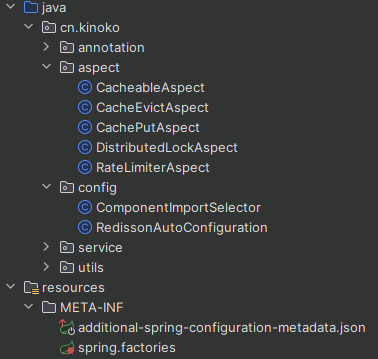
# 1.编写自动配置类
@ConfigurationProperties(prefix = "spring.redisson")
@Import(ComponentImportSelector.class)
@Configuration
public class RedissonAutoConfiguration {

    private String file;

    @Bean
    public RedissonClient redissonClient() throws IOException {
        if (file == null) {
            throw new RuntimeException("can not found spring.redisson.file config from yaml");
        }
        if (file.startsWith("classpath:")) {
            return Redisson.create(Config.fromYAML(getClass().getClassLoader().getResourceAsStream(file.substring("classpath:".length()))));
        }
        return Redisson.create(Config.fromYAML(new File(file)));
    }

    public void setFile(String file) {
        this.file = file;
    }
}
1
2
3
4
5
6
7
8
9
10
11
12
13
14
15
16
17
18
19
20
21
22
2
3
4
5
6
7
8
9
10
11
12
13
14
15
16
17
18
19
20
21
22
@Configuration:声明配置类@ConfigurationProperties(prefix = "spring.redisson"):配置文件映射@Import(ComponentImportSelector.class)加载组件扫描器
# 2.配置组件扫描
public class ComponentImportSelector implements ImportSelector {

    @Override
    public String[] selectImports(AnnotationMetadata importingClassMetadata) {
        // 从spring.factory中获取组件
        List<String> names = SpringFactoriesLoader.loadFactoryNames(ComponentImportSelector.class, null);
        return names.toArray(new String[0]);
    }
}
1
2
3
4
5
6
7
8
9
2
3
4
5
6
7
8
9
# 3.编写spring.factories文件
将自动配置类加入springboot自动装配扫描文件META-INF/spring.factories中:
# Auto Configure
org.springframework.boot.autoconfigure.EnableAutoConfiguration=\
cn.kinoko.config.RedissonAutoConfiguration

# Bean Import
cn.kinoko.config.ComponentImportSelector=\
cn.kinoko.aspect.CacheableAspect,\
cn.kinoko.aspect.CacheEvictAspect,\
cn.kinoko.aspect.CachePutAspect,\
cn.kinoko.aspect.DistributedLockAspect,\
cn.kinoko.aspect.RateLimiterAspect,\
cn.kinoko.service.impl.RedisServiceImpl
1
2
3
4
5
6
7
8
9
10
11
12
2
3
4
5
6
7
8
9
10
11
12
Auto Configure:将配置类加入springboot的自动配置的selector扫描列表中。Bean Import:将自己的BeanDefine加入组件扫描
注意
springboot2.7开始已经不推荐使用META-INF/spring.factories文件了,在springboot3完全弃用META-INF/spring.factories来加载自动配置类,改为使用META-INF/spring/org.springframework.boot.autoconfigure.AutoConfiguration.imports。
文件中直接写类路径:
cn.kinoko.config.RedissonAutoConfiguration
1
# 4.编写additional-spring-configuration-metadata.json文件
如果想在yaml或者properties文件中配置有提示,则可以创建META-INF/additional-spring-configuration-metadata.json文件:
{
  "properties": [
    {
      "name": "spring.redisson.file",
      "type": "java.lang.String",
      "description": "config yaml path",
      "defaultValue": "classpath:redisson.yaml"
    },
    {
      "name": "spring.redisson.type-match",
      "type": "java.lang.Boolean",
      "description": "是否开启key类型自动匹配",
      "defaultValue": false
    },
    {
      "name": "spring.redisson.enable-prefix",
      "type": "java.lang.Boolean",
      "description": "是否开启key前缀",
      "defaultValue": false
    },
    {
      "name": "spring.redisson.bloom-filter",
      "type": "cn.kinoko.config.ConfigProperties$BloomFilterConfig",
      "description": "布隆过滤器配置"
    },
    {
      "name": "spring.redisson.bloom-filter.key",
      "type": "java.lang.String",
      "description": "bloomFilter key name",
      "defaultValue": "bloom-filter"
    },
    {
      "name": "spring.redisson.bloom-filter.enable",
      "type": "java.lang.Boolean",
      "description": "是否开启",
      "defaultValue": false
    },
    {
      "name": "spring.redisson.bloom-filter.tolerate-error",
      "type": "java.lang.Double",
      "description": "容错率",
      "defaultValue": 0.05
    }
  ]
}
1
2
3
4
5
6
7
8
9
10
11
12
13
14
15
16
17
18
19
20
21
22
23
24
25
26
27
28
29
30
31
32
33
34
35
36
37
38
39
40
41
42
43
44
45
2
3
4
5
6
7
8
9
10
11
12
13
14
15
16
17
18
19
20
21
22
23
24
25
26
27
28
29
30
31
32
33
34
35
36
37
38
39
40
41
42
43
44
45
注意
这个文件的配置只能生效在@ConfigurationProperties标记的配置类上,并且需要写getset方法,支持lombok,如果存在嵌套层级配置的话需要写内部类,不能写在外面引用,会导致无法识别。
示例:
@Setter
@Getter
@ConfigurationProperties(prefix = "spring.redisson")
@Configuration
public class ConfigProperties {

    private String file;
    private boolean enablePrefix;
    private boolean typeMatch;
    private BloomFilterConfig bloomFilter;

    public ConfigProperties() {
        file = "classpath:redisson.yaml";
        enablePrefix = false;
        typeMatch = false;
        bloomFilter = new BloomFilterConfig();
    }

    @Getter
    @Setter
    public static class BloomFilterConfig {

        private String key;
        private boolean enable;
        private double tolerateError;

        public BloomFilterConfig() {
            key = "boolean-filter";
            enable = false;
            tolerateError = 0.05;
        }
    }

}
1
2
3
4
5
6
7
8
9
10
11
12
13
14
15
16
17
18
19
20
21
22
23
24
25
26
27
28
29
30
31
32
33
34
2
3
4
5
6
7
8
9
10
11
12
13
14
15
16
17
18
19
20
21
22
23
24
25
26
27
28
29
30
31
32
33
34
效果:
提示
更多配置可以参考:配置元数据 (opens new window)
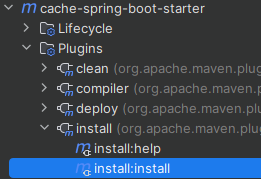
# 5.打包
# 使用
引入依赖
<dependency>
  <groupId>cn.kinoko</groupId>
  <artifactId>cache-spring-boot-starter</artifactId>
  <version>1.0-SNAPSHOT</version>
</dependency>
1
2
3
4
5
2
3
4
5
业务
@RestController
@RequestMapping("/demo")
public class DemoController {

    @Autowired
    private RedisService redisService;

    @DistributedLock
    @GetMapping("/test")
    public String test() {
        LockSupport.parkNanos(TimeUnit.SECONDS.toNanos(10));
        redisService.set("test", "test");
        return "test";
    }

}
1
2
3
4
5
6
7
8
9
10
11
12
13
14
15
16
2
3
4
5
6
7
8
9
10
11
12
13
14
15
16
上次更新: 2024/02/22 22:50:02