
 Minio
Minio
# docker安装
docker pull minio/minio
1
docker run -p 9000:9000 -p 9090:9090 \
 --name minio \
 -d --restart=always \
 -e "MINIO_ACCESS_KEY=minioadmin" \
 -e "MINIO_SECRET_KEY=minioadmin" \
 -v /usr/local/docker/minio/data:/data \
 minio/minio server \
 /data --console-address ":9090" -address ":9000"
1
2
3
4
5
6
7
8
2
3
4
5
6
7
8
- 这里的9090端口指的是minio的客户端端口。虽然设置9090,但是我们在访问9000的时候,他也会自动跳到9090。
- 9000端口是minio的服务端端口,我们程序在连接minio的时候,就是通过这个端口来连接的。
- -v就是docker run当中的挂载,这里的/mydata/minio/data:/data意思就是将容器的/data目录和宿主机的/mydata/minio/data目录做映射,这样我们想要查看容器的文件的时候,就不需要看容器当中的文件了。
- 注意在执行命令的时候,他是会自动在宿主机当中创建目录的。我们不需要手动创建。
- minio所上传的文件默认都是存储在容器的data目录下的!
- 假如删除容器了宿主机当中挂载的目录是不会删除的。假如没有使用-v挂载目录,那他在宿主机的存储位置的文件会直接删除的。
- 宿主机的挂载目录一定是根目录,如果是相对路径会有问题。还有容器当中的目录也是必须是绝对路径(根路径就是带/的)。
- 所谓的挂载其实就是将容器目录和宿主机目录进行绑定了,操作宿主机目录,容器目录也会变化,操作容器目录,宿主机目录也会变化。这样做的目的 可以间接理解为就是数据持久化,防止容器误删,导致数据丢失的情况。
- MINIO_ACCESS_KEY:账号 MINIO_SECRET_KEY:密码 (正常账号应该不低于3位,密码不低于8位,不然容器会启动不成功)
- --console-address 指定客户端端口
- -d --restart=always 代表重启linux的时候容器自动启动
- --name minio 容器名称
访问:http://[IP]:9000
2)管理控制台
假设我们的服务器地址为http://192.168.66.133:9000,我们在地址栏输入:http://192.168.200.130:9000/ (opens new window) 即可进入登录界面。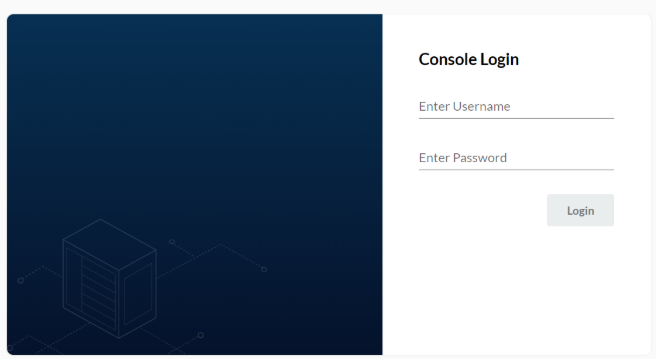
Access Key为minio Secret_key 为minio123 进入系统后可以看到主界面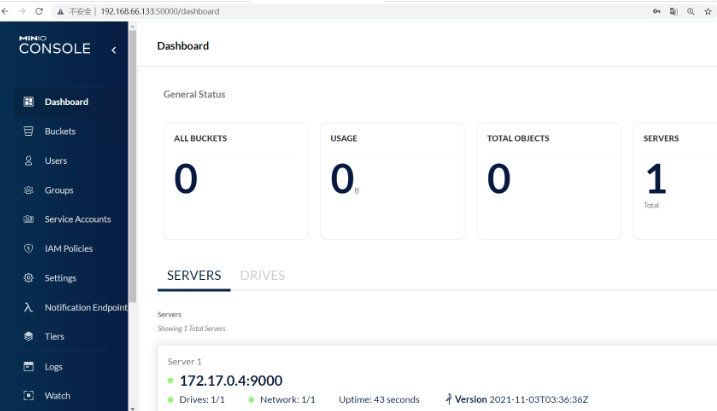
点击右边“Buckets"-> "Create Bucket"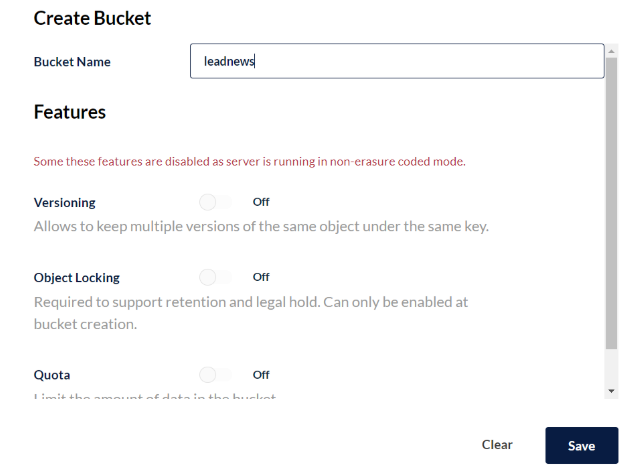
# 代码
导入依赖
<!--minio-->
<dependency>
  <groupId>io.minio</groupId>
  <artifactId>minio</artifactId>
  <version>7.1.0</version>
</dependency>
1
2
3
4
5
6
2
3
4
5
6
minio配置类
import lombok.Data;
import org.springframework.boot.context.properties.ConfigurationProperties;

/**
 * 定义MinIO的参数属性类
 */
@Data
@ConfigurationProperties(prefix = "minio") // 加载yml文件中的前缀
public class MinIOProperties {
    private String accessKey;//账户名称
    private String secretKey;//账户密码
    private String endpoint;//MinIO连接地址   http://192.168.66.133:9000/

    private String bucket;//桶名称
    private String readPath;//访问文件的地址  http://192.168.66.133:9000/
}
1
2
3
4
5
6
7
8
9
10
11
12
13
14
15
16
2
3
4
5
6
7
8
9
10
11
12
13
14
15
16
import io.minio.MinioClient;
import org.springframework.beans.factory.annotation.Autowired;
import org.springframework.boot.context.properties.EnableConfigurationProperties;
import org.springframework.context.annotation.Bean;
import org.springframework.context.annotation.Configuration;

@Configuration
@EnableConfigurationProperties(MinIOProperties.class)
public class MinIOConfiguration {

    @Autowired
    private MinIOProperties minioProperties;

    @Bean
    public MinioClient getMinioClient(){
        return MinioClient.builder()
                .credentials(minioProperties.getAccessKey(), minioProperties.getSecretKey())
                .endpoint(minioProperties.getEndpoint())
                .build();
    }

}
1
2
3
4
5
6
7
8
9
10
11
12
13
14
15
16
17
18
19
20
21
22
2
3
4
5
6
7
8
9
10
11
12
13
14
15
16
17
18
19
20
21
22
minio工具类
import io.minio.GetObjectArgs;
import io.minio.MinioClient;
import io.minio.PutObjectArgs;
import io.minio.RemoveObjectArgs;
import lombok.extern.slf4j.Slf4j;
import org.apache.commons.lang3.StringUtils;
import org.springframework.beans.factory.annotation.Autowired;
import org.springframework.stereotype.Component;

import java.io.ByteArrayOutputStream;
import java.io.IOException;
import java.io.InputStream;
import java.text.SimpleDateFormat;
import java.util.Date;

import io.minio.GetObjectArgs;
import io.minio.MinioClient;
import io.minio.PutObjectArgs;
import io.minio.RemoveObjectArgs;
import lombok.extern.slf4j.Slf4j;
import org.apache.commons.lang3.StringUtils;
import org.springframework.beans.factory.annotation.Autowired;
import org.springframework.stereotype.Component;

import java.io.ByteArrayOutputStream;
import java.io.IOException;
import java.io.InputStream;
import java.text.SimpleDateFormat;
import java.util.Date;

@Component
@Slf4j
public class MinIOFileStorageService{

    @Autowired
    private MinioClient minioClient;

    @Autowired
    private MinIOProperties minIOConfigProperties;

    private final static String separator = "/";

    /**
     * @param dirPath
     * @param filename  yyyy/mm/dd/file.jpg
     * @return
     */
    public String builderFilePath(String dirPath,String filename) {
        StringBuilder stringBuilder = new StringBuilder(50);
        if(!StringUtils.isEmpty(dirPath)){
            stringBuilder.append(dirPath).append(separator);
        }
        SimpleDateFormat sdf = new SimpleDateFormat("yyyy/MM/dd");
        String todayStr = sdf.format(new Date());
        stringBuilder.append(todayStr).append(separator);
        stringBuilder.append(filename);
        return stringBuilder.toString();
    }

    /**
     *  上传图片文件
     * @param prefix  文件前缀
     * @param filename  文件名
     * @param inputStream 文件流
     * @return  文件全路径
     */
    public String uploadImgFile(String prefix, String filename, InputStream inputStream) {
        String filePath = builderFilePath(prefix, filename);
        try {
            PutObjectArgs putObjectArgs = PutObjectArgs.builder()
                    .object(filePath)
                    .contentType("image/jpg")
                    .bucket(minIOConfigProperties.getBucket())
                    .stream(inputStream,inputStream.available(),-1)
                    .build();
            minioClient.putObject(putObjectArgs);
            StringBuilder urlPath = new StringBuilder(minIOConfigProperties.getReadPath());
            urlPath.append(separator+minIOConfigProperties.getBucket());
            urlPath.append(separator);
            urlPath.append(filePath);
            return urlPath.toString();
        }catch (Exception ex){
            log.error("minio put file error.",ex);
            throw new RuntimeException("上传文件失败");
        }
    }

    /**
     *  上传html文件
     * @param prefix  文件前缀
     * @param filename   文件名
     * @param inputStream  文件流
     * @return  文件全路径
     */
    public String uploadHtmlFile(String prefix, String filename,InputStream inputStream) {
        String filePath = builderFilePath(prefix, filename);
        try {
            PutObjectArgs putObjectArgs = PutObjectArgs.builder()
                    .object(filePath)
                    .contentType("text/html")
                    .bucket(minIOConfigProperties.getBucket())
                    .stream(inputStream,inputStream.available(),-1)
                    .build();
            minioClient.putObject(putObjectArgs);
            StringBuilder urlPath = new StringBuilder(minIOConfigProperties.getReadPath());
            urlPath.append(separator+minIOConfigProperties.getBucket());
            urlPath.append(separator);
            urlPath.append(filePath);
            return urlPath.toString();
        }catch (Exception ex){
            log.error("minio put file error.",ex);
            ex.printStackTrace();
            throw new RuntimeException("上传文件失败");
        }
    }

    /**
     * 删除文件
     * @param pathUrl  文件全路径
     */
    public void delete(String pathUrl) {
        String key = pathUrl.replace(minIOConfigProperties.getEndpoint()+"/","");
        int index = key.indexOf(separator);
        String bucket = key.substring(0,index);
        String filePath = key.substring(index+1);
        // 删除Objects
        RemoveObjectArgs removeObjectArgs = RemoveObjectArgs.builder().bucket(bucket).object(filePath).build();
        try {
            minioClient.removeObject(removeObjectArgs);
        } catch (Exception e) {
            log.error("minio remove file error.  pathUrl:{}",pathUrl);
            e.printStackTrace();
        }
    }


    /**
     * 下载文件
     * @param pathUrl  文件全路径
     * @return  文件流
     *
     */
    public byte[] downLoadFile(String pathUrl)  {
        String key = pathUrl.replace(minIOConfigProperties.getEndpoint()+"/","");
        int index = key.indexOf(separator);
        String bucket = key.substring(0,index);
        String filePath = key.substring(index+1);
        InputStream inputStream = null;
        try {
            inputStream = minioClient.getObject(GetObjectArgs.builder().bucket(minIOConfigProperties.getBucket()).object(filePath).build());
        } catch (Exception e) {
            log.error("minio down file error.  pathUrl:{}",pathUrl);
            e.printStackTrace();
        }

        ByteArrayOutputStream byteArrayOutputStream = new ByteArrayOutputStream();
        byte[] buff = new byte[100];
        int rc = 0;
        while (true) {
            try {
                if (!((rc = inputStream.read(buff, 0, 100)) > 0)) break;
            } catch (IOException e) {
                e.printStackTrace();
            }
            byteArrayOutputStream.write(buff, 0, rc);
        }
        return byteArrayOutputStream.toByteArray();
    }
}
1
2
3
4
5
6
7
8
9
10
11
12
13
14
15
16
17
18
19
20
21
22
23
24
25
26
27
28
29
30
31
32
33
34
35
36
37
38
39
40
41
42
43
44
45
46
47
48
49
50
51
52
53
54
55
56
57
58
59
60
61
62
63
64
65
66
67
68
69
70
71
72
73
74
75
76
77
78
79
80
81
82
83
84
85
86
87
88
89
90
91
92
93
94
95
96
97
98
99
100
101
102
103
104
105
106
107
108
109
110
111
112
113
114
115
116
117
118
119
120
121
122
123
124
125
126
127
128
129
130
131
132
133
134
135
136
137
138
139
140
141
142
143
144
145
146
147
148
149
150
151
152
153
154
155
156
157
158
159
160
161
162
163
164
165
166
167
168
169
2
3
4
5
6
7
8
9
10
11
12
13
14
15
16
17
18
19
20
21
22
23
24
25
26
27
28
29
30
31
32
33
34
35
36
37
38
39
40
41
42
43
44
45
46
47
48
49
50
51
52
53
54
55
56
57
58
59
60
61
62
63
64
65
66
67
68
69
70
71
72
73
74
75
76
77
78
79
80
81
82
83
84
85
86
87
88
89
90
91
92
93
94
95
96
97
98
99
100
101
102
103
104
105
106
107
108
109
110
111
112
113
114
115
116
117
118
119
120
121
122
123
124
125
126
127
128
129
130
131
132
133
134
135
136
137
138
139
140
141
142
143
144
145
146
147
148
149
150
151
152
153
154
155
156
157
158
159
160
161
162
163
164
165
166
167
168
169
工具类使用示例
定义MinIOProperties属性类,用于加载minIO的属性
import lombok.Data;
import org.springframework.boot.context.properties.ConfigurationProperties;

/**
 * 定义MinIO的参数属性类
 */
@Data
@ConfigurationProperties(prefix = "minio") // 加载yml文件中的前缀
public class MinIOProperties {
    private String accessKey;//账户名称
    private String secretKey;//账户密码
    private String endpoint;//MinIO连接地址   http://192.168.66.133:9000/

    private String bucket;//桶名称
    private String readPath;//访问文件的地址  http://192.168.66.133:9000/
}
1
2
3
4
5
6
7
8
9
10
11
12
13
14
15
16
2
3
4
5
6
7
8
9
10
11
12
13
14
15
16
初始化MinioClient对象
import io.minio.MinioClient;
import org.springframework.beans.factory.annotation.Autowired;
import org.springframework.beans.factory.annotation.Value;
import org.springframework.boot.context.properties.EnableConfigurationProperties;
import org.springframework.context.annotation.Bean;
import org.springframework.context.annotation.Configuration;

/**
 * 初始MinIO连接对象配置类
 */
@Configuration
@EnableConfigurationProperties(MinIOConfigProperties.class)
public class MinIOConfiguration {
    @Autowired
    private MinIOConfigProperties minIOConfigProperties;

    @Bean
    public MinioClient createMinioClient(){
        return MinioClient.builder()
                .credentials(minIOConfigProperties.getAccessKey(),minIOConfigProperties.getSecretKey())
                .endpoint(minIOConfigProperties.getEndpoint())
                .build();
    }
}
1
2
3
4
5
6
7
8
9
10
11
12
13
14
15
16
17
18
19
20
21
22
23
24
2
3
4
5
6
7
8
9
10
11
12
13
14
15
16
17
18
19
20
21
22
23
24
yml配置,添加MinIO配置
minio:
  accessKey: minio
  secretKey: minio123
  bucket: leadnews
  endpoint: http://192.168.66.133:9000
  readPath: http://192.168.66.133:9000
1
2
3
4
5
6
2
3
4
5
6
在config目录编写配置类
import org.springframework.context.annotation.ComponentScan;
import org.springframework.context.annotation.Configuration;
@Configuration
@ComponentScan("com.heima.common.minio")
public class MinIOConfig {
}
1
2
3
4
5
6
2
3
4
5
6
编写测试类
import com.heima.article.ArticleApplication;
import com.heima.common.minio.MinIOFileStorageService;
import org.junit.Test;
import org.junit.runner.RunWith;
import org.springframework.beans.factory.annotation.Autowired;
import org.springframework.boot.test.context.SpringBootTest;
import org.springframework.test.context.junit4.SpringRunner;

import java.io.FileInputStream;
import java.io.FileNotFoundException;

@RunWith(SpringRunner.class)
@SpringBootTest(classes = ArticleApplication.class)
public class MinIOTest {

    @Autowired
    private MinIOFileStorageService storageService;

    /**
     * 上传html文件
     */
    @Test
    public void testUpload() throws Exception {
        FileInputStream inputStream = new FileInputStream("d:/list.html");
        storageService.uploadHtmlFile("","list.html",inputStream);
    }

    /**
     * 下载文件
     * @throws Exception
     */
    @Test
    public void testDown() throws Exception {
        String path = "leadnews/2022/03/14/list.html";
        byte[] bytes = storageService.downLoadFile(path);
        System.out.println(bytes);
    }

    /**
     * 删除文件
     * @throws Exception
     */
    @Test
    public void testRemove() throws Exception {
        String path = "leadnews/2022/03/14/list.html";
        storageService.delete(path);
    }
}
1
2
3
4
5
6
7
8
9
10
11
12
13
14
15
16
17
18
19
20
21
22
23
24
25
26
27
28
29
30
31
32
33
34
35
36
37
38
39
40
41
42
43
44
45
46
47
48
2
3
4
5
6
7
8
9
10
11
12
13
14
15
16
17
18
19
20
21
22
23
24
25
26
27
28
29
30
31
32
33
34
35
36
37
38
39
40
41
42
43
44
45
46
47
48
测试结果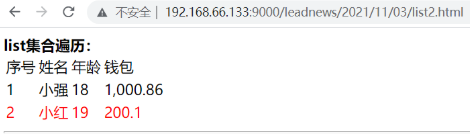
上次更新: 2023/12/29 11:32:56