
 GITLAB AI 评审方案

极狐GitLab - 企业级DevOps平台 (opens new window)
# 前言
目前AI 评审可以做的很复杂,很完善,这里仅提供一个低成本的搭建思路,有一个gitlab平台即可
# 评审效果
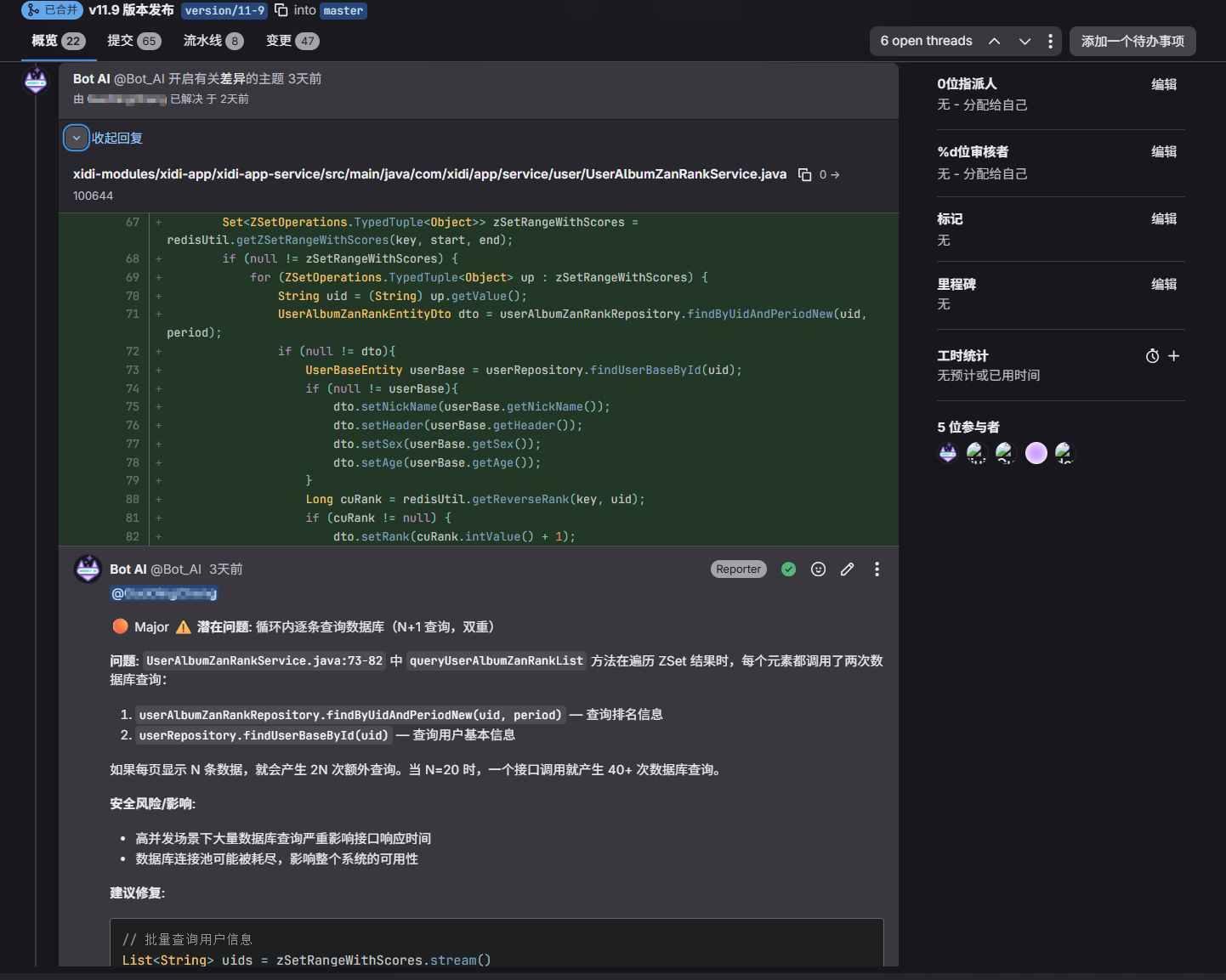
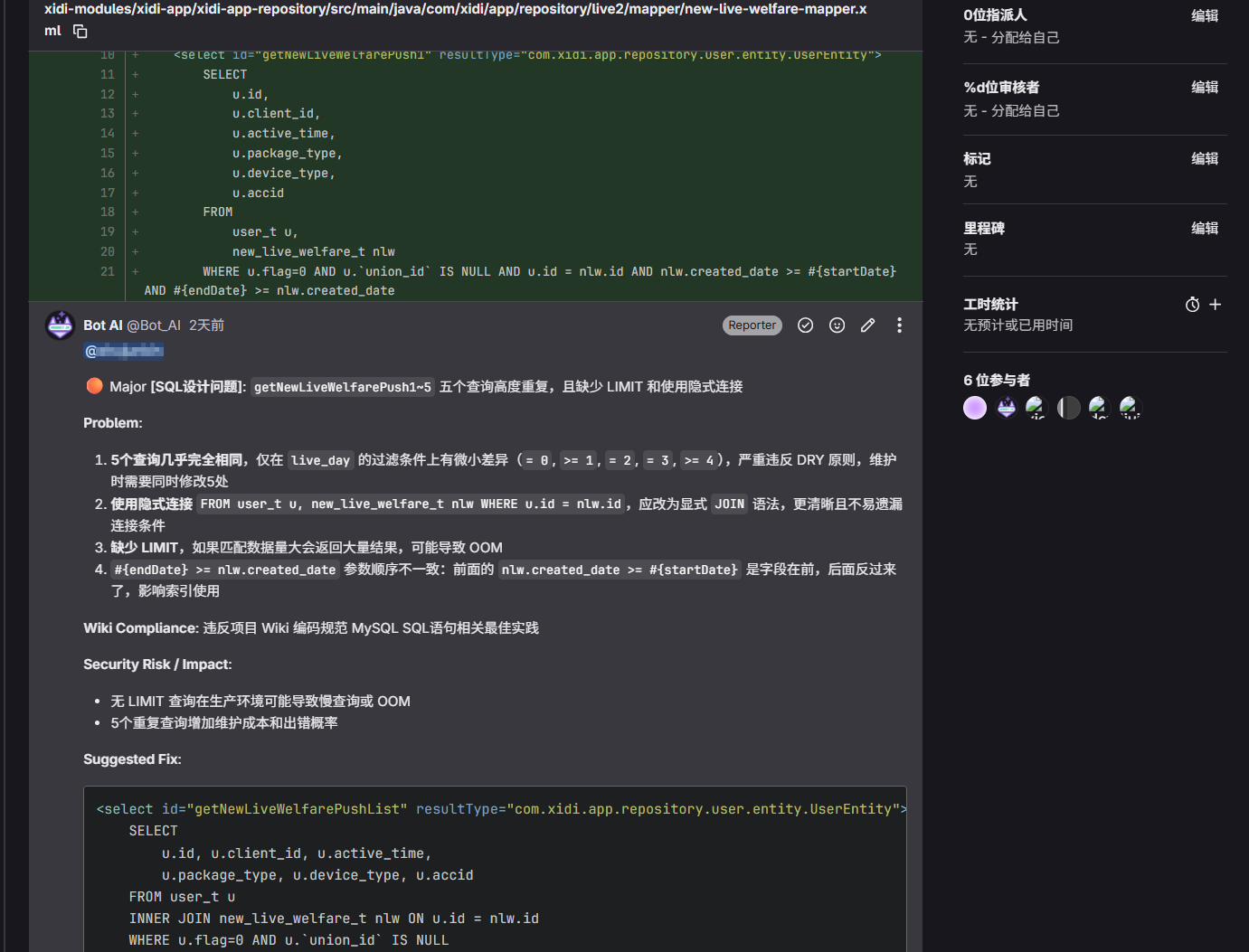
核心目标:
- 找出风险点,提及代码提交人
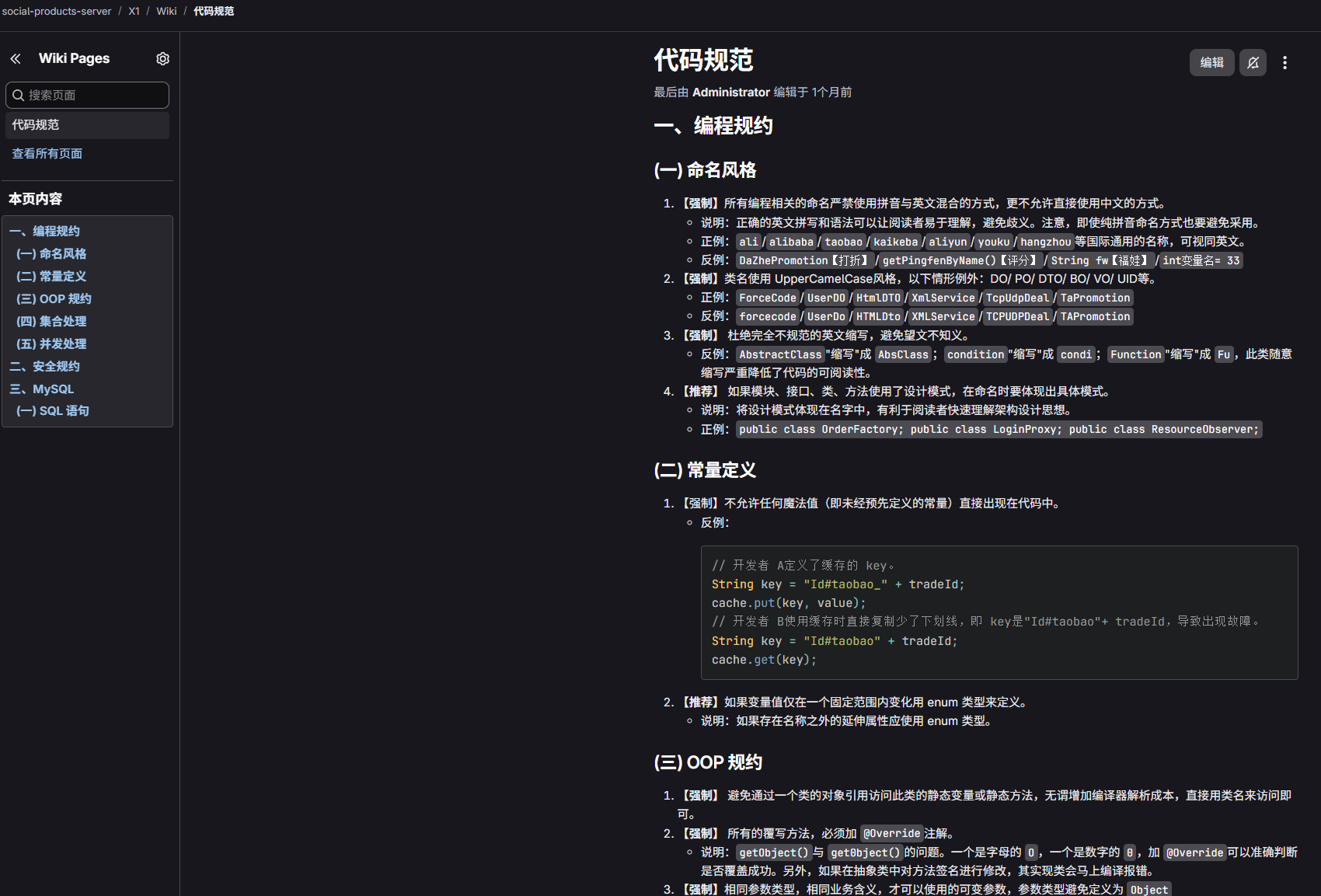
- 支持通过wiki自定义项目编码规范,AI 自动纳入评审参考
# 在问题代码下方创建主题评论
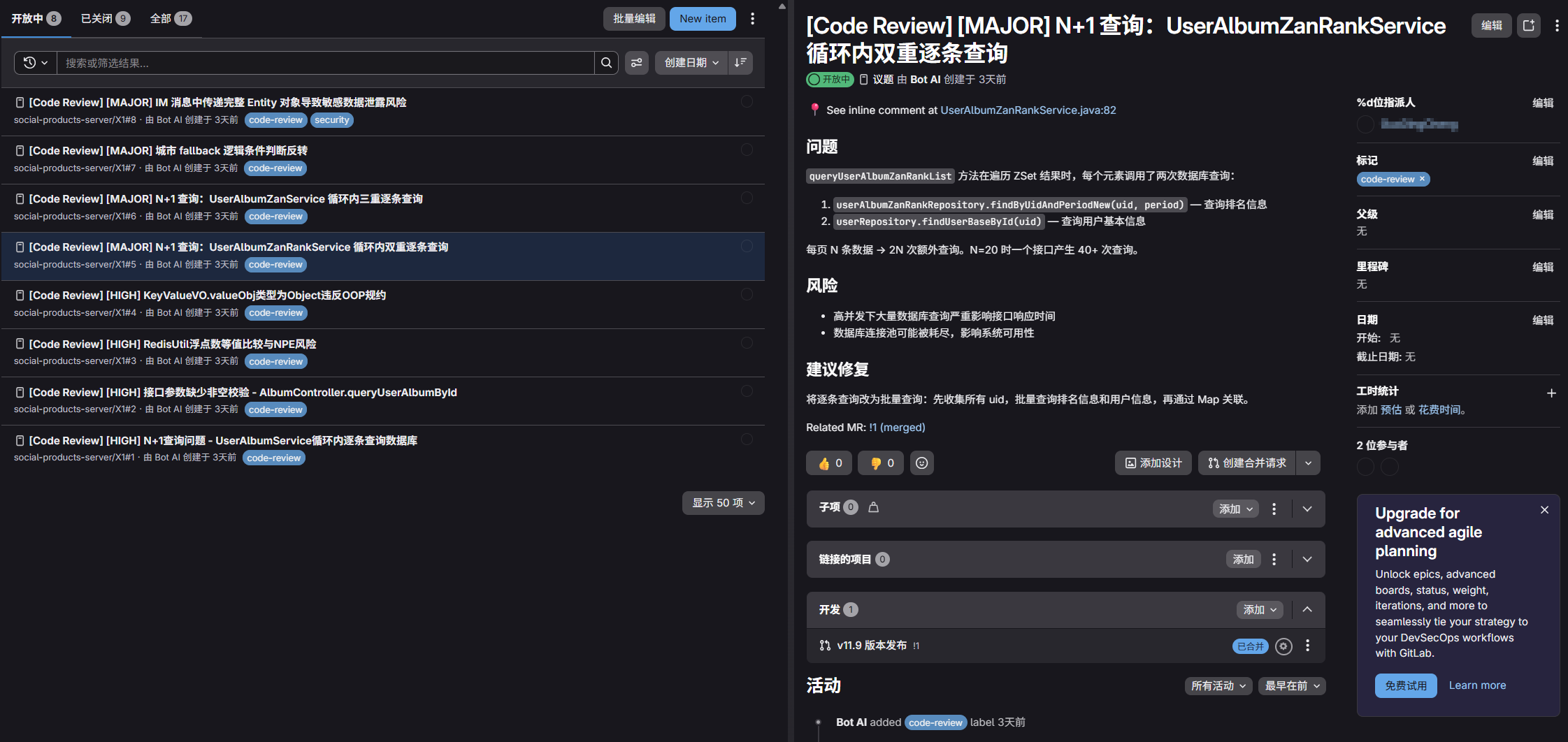
# 对于高风险问题创建issue
# 自定义编码规范 wiki
# 思路参考
适用所有团队研发提效|带你1分钟上手基于Claude Code的AI代码评审实践 (opens new window)
C3仓库AI代码门禁通用实践:基于Qwen3-Coder+RAG的代码评审 (opens new window)
Qoder CLI + GitLab CI:智能代码审查最佳实践 (opens new window)
# 环境准备
# 安装gitlab
docker run -d \
      --hostname 127.0.0.1 \
      --publish 80:80 \
      --publish 2222:22 \
      --name gitlab \
      --restart always \
      --shm-size 512m \
      --volume /data/gitlab/config:/etc/gitlab \
      --volume /data/gitlab/logs:/var/log/gitlab \
      --volume /data/gitlab/data:/var/opt/gitlab \
      --log-driver json-file \
      --log-opt max-size=500m \
      --log-opt max-file=5 \
      gitlab/gitlab-ce:latest
1
2
3
4
5
6
7
8
9
10
11
12
13
14
2
3
4
5
6
7
8
9
10
11
12
13
14
默认密码在 /data/gitlab/config/initial_root_password
# 准备一个AI 用的gitlab账号
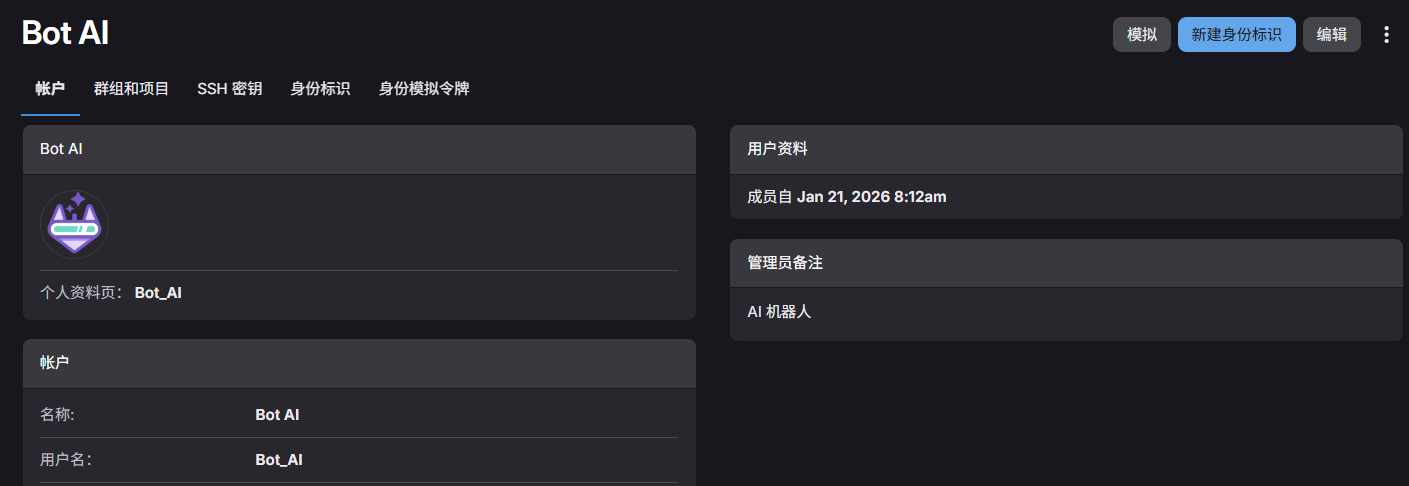
并生成访问令牌,用于后续注册 runner 以及 mcp的部署
# 安装runner
docker run -d --name gitlab-runner-1 --restart always \
  -v /var/run/docker.sock:/var/run/docker.sock \
  -v /data/gitlab-runner/runner-1/config:/etc/gitlab-runner \
  gitlab/gitlab-runner:latest
1
2
3
4
2
3
4
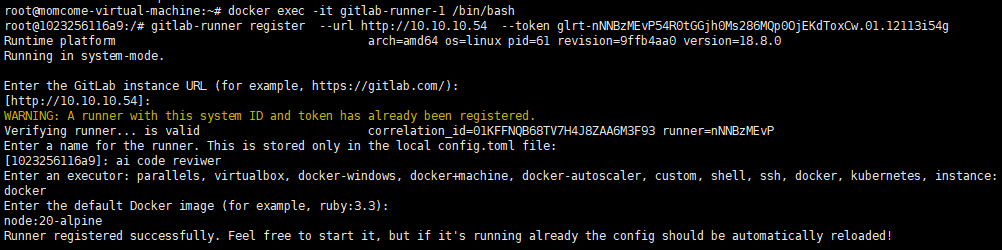
运行后,进入容器内部执行注册指令
docker exec -it gitlab-runner-1 /bin/bash
# 复制在gitlab创建runner后给出的token注册指令
gitlab-runner register  --url http://10.10.10.54  --token glrt-nNNBzMEvP54R0tGGjh0Ms286MQp0OjEKdToxCw.01.12113i54g
1
2
3
2
3
# 安装gitlab-mcp
docker run -d --name gitlab-mcp --restart always \
  -e HOST=0.0.0.0 \
  -e GITLAB_PERSONAL_ACCESS_TOKEN=glpat-JqpkzrO4jR62cT3usRNdiW86MQp1OjQH.01.0w140yhkq \
  -e GITLAB_API_URL="http://10.10.10.54/api/v4" \
  -e GITLAB_READ_ONLY_MODE=true \
  -e USE_GITLAB_WIKI=true \
  -e USE_MILESTONE=true \
  -e USE_PIPELINE=true \
  -e SSE=true \
  -p 3333:3002 \
  zereight050/gitlab-mcp
1
2
3
4
5
6
7
8
9
10
11
2
3
4
5
6
7
8
9
10
11
# .gitlab-ci.yml 配置(可直接用)
# ============================================================================
# GitLab CI - Claude Code 自动代码审查流水线
# ============================================================================
#
# 本配置文件提供两种代码审查模式:
# 1. 通用审查 (claude-review-common): 快速扫描,适合日常 MR 审查
# 2. 深度审查 (claude-review-deep): 深度分析,追踪调用链,适合重要功能审查
#
# 使用方式:
# - 在 GitLab MR Pipeline 界面,手动选择执行对应的审查任务
# - 两个任务都会在 MR 上创建内联评论和总结报告
# - HIGH+ 严重性问题会自动创建 GitLab Issue
# ============================================================================

stages:
  - review

# ============================================================================
# 共享配置模板
# ============================================================================
.claude-review-base:
  stage: review
  image: node:20-alpine

  variables:
    GIT_DEPTH: 0

  rules:
    - if: $CI_PIPELINE_SOURCE == "merge_request_event"
      when: manual

  before_script:
    # --------------------------------------------------------------------
    # [工具链和依赖安装]
    # --------------------------------------------------------------------

    # A. 安装系统依赖
    - apk add --no-cache glab git bash util-linux shadow sudo jq

    # 创建非 root 用户(Claude Code 要求)
    - echo "👤 创建非 root 用户 'claude-user'..."
    - adduser -D -s /bin/bash claude-user
    - echo "claude-user ALL=(ALL) NOPASSWD:ALL" >> /etc/sudoers

    # 设置工作目录权限
    - chown -R claude-user:claude-user $CI_PROJECT_DIR

    # B. 安装 Claude Code CLI
    - echo "📦 安装 Claude Code CLI..."
    - npm install -g @anthropic-ai/claude-code

    # 验证 Claude Code 安装
    - echo "✅ 验证 Claude Code 安装:"
    - claude --version

    # C. 配置 Claude Code 环境(智谱 API 代理)
    - echo "🔧 配置 Claude Code 环境(智谱 API 代理)..."

    # 调试:检查环境变量
    - echo "📋 检查环境变量:"
    - echo "ZHIPU_API_KEY 是否存在:$(if [ -n \"$ZHIPU_API_KEY\" ]; then echo '✅ 已设置'; else echo '❌ 未设置'; fi)"
    - echo "ZHIPU_API_KEY 长度:${#ZHIPU_API_KEY}"
    - echo "GITLAB_TOKEN 是否存在:$(if [ -n \"$GITLAB_TOKEN\" ]; then echo '✅ 已设置'; else echo '❌ 未设置'; fi)"
    - echo "当前工作目录:$CI_PROJECT_DIR"

    # 为 claude-user 创建配置目录
    - su claude-user -c 'mkdir -p ~/.claude'

    # 1. 创建 settings.json(API 配置)
    - |
      su claude-user -c "cat > ~/.claude/settings.json << 'EOFCONFIG'
      {
        \"env\": {
          \"ANTHROPIC_AUTH_TOKEN\": \"xxxxxxxxxxxxxxxxxxxxxxxx\",
          \"ANTHROPIC_BASE_URL\": \"https://open.bigmodel.cn/api/anthropic\",
          \"API_TIMEOUT_MS\": \"3000000\",
          \"CLAUDE_CODE_DISABLE_NONESSENTIAL_TRAFFIC\": 1,
          \"ANTHROPIC_DEFAULT_HAIKU_MODEL\": \"GLM-5.1\",
          \"ANTHROPIC_DEFAULT_SONNET_MODEL\": \"GLM-5.1\",
          \"ANTHROPIC_DEFAULT_OPUS_MODEL\": \"GLM-5.1\"
        }
      }
      EOFCONFIG
      "

    # 2. 创建 .claude.json(MCP 配置)
    - |
      su claude-user -c "cat > ~/.claude.json << 'EOFMCP'
      {
        \"projects\": {
          \"$CI_PROJECT_DIR\": {
            \"allowedTools\": [],
            \"mcpContextUris\": [],
            \"mcpServers\": {
              \"gitlab_mcp\": {
                \"type\": \"sse\",
                \"url\": \"http://10.10.10.54:3333/sse\"
              }
            }
          }
        }
      }
      EOFMCP
      "

    - echo "✅ Claude 环境配置已创建(使用智谱 API)"

    # 调试:输出生成的配置文件内容
    - echo "📄 settings.json 内容:"
    - su claude-user -c 'cat ~/.claude/settings.json'
    - echo ""
    - echo "📄 .claude.json 内容:"
    - su claude-user -c 'cat ~/.claude.json'

    # D. 验证 MCP 配置
    - echo ""
    - echo "🔍 验证 MCP 服务器连接..."
    - |
      cd $CI_PROJECT_DIR
      MCP_OUTPUT=$(su claude-user -c 'claude mcp list' 2>&1)
      echo "$MCP_OUTPUT"

      if echo "$MCP_OUTPUT" | grep -q "gitlab_mcp" && echo "$MCP_OUTPUT" | grep -q "✓ Connected"; then
        echo ""
        echo "✅ MCP 服务器 gitlab_mcp 已成功连接"
      else
        echo ""
        echo "❌ MCP 服务器 gitlab_mcp 连接失败"
        echo "请检查:"
        echo "  1. GitLab Token 是否有效"
        echo "  2. GitLab API URL 是否正确"
        echo "  3. 网络连接是否正常"
        exit 1
      fi

  script:
    # ========================================================================
    # 智能审查模式:根据 MR 大小自动选择单次审查或分批审查
    # ========================================================================
    - |
      echo "🔍 检测 MR 规模..."

      # 构造 API URL
      API_URL="http://10.10.10.54/api/v4/projects/${CI_MERGE_REQUEST_PROJECT_ID}/merge_requests/${CI_MERGE_REQUEST_IID}"
      echo "  API URL: $API_URL"
      echo ""

      # 使用 wget + GitLab API 获取 MR 信息(添加超时)
      echo "🔧 尝试获取MR信息..."

      MR_JSON=$(wget --timeout=10 -q -O- \
        --header="PRIVATE-TOKEN: glpat-xxxxxxxxxxxxxxxxxxxxxxxxxxxxxxxxxxxxxxxxxxx" \
        "$API_URL" 2>&1)

      WGET_EXIT_CODE=$?

      if [ $WGET_EXIT_CODE -ne 0 ]; then
        echo "❌ wget 调用失败,错误信息:"
        echo "$MR_JSON"
      fi

      if [ $WGET_EXIT_CODE -eq 0 ] && [ -n "$MR_JSON" ]; then
        echo "✅ API 调用成功"
        CHANGE_COUNT=$(echo "$MR_JSON" | jq -r '.changes_count // 0' 2>/dev/null)

        if [ -z "$CHANGE_COUNT" ] || [ "$CHANGE_COUNT" = "null" ] || [ "$CHANGE_COUNT" = "0" ]; then
          echo "⚠️ 无法解析 changes_count 或值为 0,使用默认值 1"
          CHANGE_COUNT=1
        else
          echo "📊 检测到 $CHANGE_COUNT 个文件变更"
        fi
      else
        echo "❌ API 调用失败"
        echo "⚠️ 使用默认值 1(强制进入标准审查模式)"
        CHANGE_COUNT=1
      fi

      echo ""

      # 设置批次阈值
      BATCH_THRESHOLD=50

      if [ "$CHANGE_COUNT" -gt "$BATCH_THRESHOLD" ]; then
        echo "⚠️ 文件数超过 $BATCH_THRESHOLD,启用分批审查模式"
        echo ""

        # ====================================================================
        # 智能分批审查模式
        # ====================================================================

        # 获取 MR 完整数据(强制展开折叠的 diff)
        echo "📋 获取 MR 完整数据..."
        MR_CHANGES=$(wget -q -O- \
          --header="PRIVATE-TOKEN: glpat-xxxxxxxxxxxxxxxxxxxxxxxxxxxxxxxxxxxxxxxxxxxxx" \
          "http://10.10.10.54/api/v4/projects/${CI_MERGE_REQUEST_SOURCE_PROJECT_ID}/merge_requests/${CI_MERGE_REQUEST_IID}/changes?access_raw_diffs=true")

        # 保存到临时文件
        echo "$MR_CHANGES" > /tmp/mr_changes.json
        echo "✅ MR 数据已保存到 /tmp/mr_changes.json"

        # 复制智能分批脚本到临时目录
        cp $CI_PROJECT_DIR/smart-batching.js /tmp/smart-batching.js

        # 执行智能分批
        echo ""
        echo "🧠 执行智能分批..."
        cd /tmp && node smart-batching.js /tmp/mr_changes.json

        if [ $? -ne 0 ]; then
          echo "❌ 智能分批失败,退出"
          exit 1
        fi

        # 获取批次数量
        TOTAL_BATCHES=$(ls -1 /tmp/batches/batch-*.json 2>/dev/null | wc -l)

        if [ "$TOTAL_BATCHES" -eq 0 ]; then
          echo "❌ 未找到批次文件,退出"
          exit 1
        fi

        echo ""
        echo "✅ 智能分批完成,共生成 $TOTAL_BATCHES 个批次"
        echo ""

        # 批次循环(按数字顺序)
        for BATCH_NUM in $(seq 1 $TOTAL_BATCHES); do
          BATCH_FILE="/tmp/batches/batch-${BATCH_NUM}.json"

          echo "━━━━━━━━━━━━━━━━━━━━━━━━━━━━━━━━━━━━━━━━━━━━━━━━━━━━━━━━━━"
          echo "📦 批次 $BATCH_NUM/$TOTAL_BATCHES"
          echo "━━━━━━━━━━━━━━━━━━━━━━━━━━━━━━━━━━━━━━━━━━━━━━━━━━━━━━━━━━"

          # 从批次文件中提取信息
          BATCH_INFO=$(cat "$BATCH_FILE" | jq -r '.batchInfo')
          BATCH_NAME=$(echo "$BATCH_INFO" | jq -r '.batchName')
          FILES_IN_BATCH=$(echo "$BATCH_INFO" | jq -r '.filesInBatch')
          TOTAL_FILES=$(echo "$BATCH_INFO" | jq -r '.totalFiles')
          BATCH_CATEGORY=$(echo "$BATCH_INFO" | jq -r '.batchCategory')

          echo "📂 批次名称: $BATCH_NAME"
          echo "📄 文件数量: $FILES_IN_BATCH"
          echo "🏷️  批次类型: $BATCH_CATEGORY"
          echo ""

          # 生成批次提示词
          echo "## 🔄 智能分批审查模式 (CRITICAL - READ THIS FIRST)" > /tmp/batch_prompt_${BATCH_NUM}.txt
          echo "" >> /tmp/batch_prompt_${BATCH_NUM}.txt
          echo "**批次信息**: $BATCH_NUM / $TOTAL_BATCHES" >> /tmp/batch_prompt_${BATCH_NUM}.txt
          echo "**批次名称**: $BATCH_NAME" >> /tmp/batch_prompt_${BATCH_NUM}.txt
          echo "**文件数量**: $FILES_IN_BATCH 个文件" >> /tmp/batch_prompt_${BATCH_NUM}.txt
          echo "**批次类型**: $BATCH_CATEGORY (modified=修改文件, new=新文件, mixed=混合)" >> /tmp/batch_prompt_${BATCH_NUM}.txt
          echo "**累计进度**: 批次 $BATCH_NUM/$TOTAL_BATCHES (总计 $TOTAL_FILES 个文件)" >> /tmp/batch_prompt_${BATCH_NUM}.txt
          echo "" >> /tmp/batch_prompt_${BATCH_NUM}.txt
          echo "**📋 批次数据文件**: $BATCH_FILE" >> /tmp/batch_prompt_${BATCH_NUM}.txt
          echo "" >> /tmp/batch_prompt_${BATCH_NUM}.txt
          echo "**⚠️ 重要说明 (MUST FOLLOW)**:" >> /tmp/batch_prompt_${BATCH_NUM}.txt
          echo "1. **批次文件包含完整数据**: 该批次文件包含了完整的 MR 元信息和该批次的 changes 数组" >> /tmp/batch_prompt_${BATCH_NUM}.txt
          echo "2. **读取批次文件**: 使用 Read 工具读取 $BATCH_FILE 获取完整的批次数据" >> /tmp/batch_prompt_${BATCH_NUM}.txt
          echo "3. **审查范围**: 只审查该批次文件中 changes 数组里的文件,忽略其他批次的文件" >> /tmp/batch_prompt_${BATCH_NUM}.txt
          echo "4. **MR 上下文**: 批次文件中包含了 MR 的 title, description, author 等元信息,可用于理解整体背景" >> /tmp/batch_prompt_${BATCH_NUM}.txt
          echo "5. **Diff 内容**: 每个 change 对象包含完整的 diff 内容,可直接分析代码变更" >> /tmp/batch_prompt_${BATCH_NUM}.txt
          echo "6. **报告标题**: 在最终报告中使用标题 \"## 📊 Code Review Summary - 批次 $BATCH_NUM/$TOTAL_BATCHES\"" >> /tmp/batch_prompt_${BATCH_NUM}.txt
          echo "" >> /tmp/batch_prompt_${BATCH_NUM}.txt
          echo "---" >> /tmp/batch_prompt_${BATCH_NUM}.txt
          echo "" >> /tmp/batch_prompt_${BATCH_NUM}.txt

          # 添加原始审查提示词
          echo "$REVIEW_PROMPT" >> /tmp/batch_prompt_${BATCH_NUM}.txt

          # 执行审查
          echo "🤖 启动 Claude Code..."
          su claude-user -c "cd $CI_PROJECT_DIR && claude -p \"\$(cat /tmp/batch_prompt_${BATCH_NUM}.txt)\" --output-format stream-json --verbose --dangerously-skip-permissions"

          if [ $? -eq 0 ]; then
            echo "✅ 批次 $BATCH_NUM 完成"
          else
            echo "❌ 批次 $BATCH_NUM 失败,继续下一批次"
          fi

          # 批次间延迟
          if [ "$BATCH_NUM" -lt "$TOTAL_BATCHES" ]; then
            echo "⏳ 等待 3 秒..."
            sleep 3
          fi

          echo ""
        done

        echo "✅ 所有批次完成!"
        echo "📊 统计: $TOTAL_FILES 文件, $TOTAL_BATCHES 批次"

      else
        echo "✅ 文件数未超过 $BATCH_THRESHOLD,使用标准单次审查模式"
        echo ""

        # ====================================================================
        # 标准单次审查模式
        # ====================================================================
        su claude-user -c 'claude -p "$REVIEW_PROMPT" --output-format stream-json --verbose --dangerously-skip-permissions'
      fi

# ============================================================================
# Job 1: 通用审查 (快速扫描)
# ============================================================================
claude-review-common:
  extends: .claude-review-base

  variables:
    REVIEW_PROMPT: >
      You are a **Senior Technical Lead** acting as a rigorous code review partner.
      Your goal is not just to find bugs, but to elevate the code quality, ensure maintainability, and prevent architectural decay.

      Context Info: GitLab Project ${CI_MERGE_REQUEST_SOURCE_PROJECT_ID}, MR !${CI_MERGE_REQUEST_IID}

      ## Core Principles
      1. **Think Like a Maintainer**: Ask yourself, "If I have to debug this at 3 AM in 6 months, will I be happy?"
      2. **Provides three types of review feedback:**:
          - ⚠️ Potential issue - Identifies potential bugs, security vulnerabilities, or problematic code patterns
          - 🛠️ Refactor suggestion - Recommends code improvements for maintainability, performance, or best practices
          - 🧹 Nitpick - suggestions for addressing violations of the project wiki guidelines
      3. **Explain the "Why"**: Don't just say "X is wrong." Explain the security risk, impact, and potential exploit scenario.
      4. **Consolidate (Critical)**: If multiple issues appear in the same function, **merge them into a single Finding**.

      ## Review Workflow

      **Step -1: Fetch Project Coding Standards (Wiki) - MANDATORY**
      BEFORE starting code review, fetch project coding standards and conventions from Wiki:
      * Use GitLab MCP tools `list_wiki_pages` and `get_wiki_page` to retrieve wiki content
      * Look for pages containing: coding standards, best practices, security guidelines, architecture decisions
      * **Fallback**: If wiki is not available or fetching fails, proceed with general best practices

      **Step 0: Fetch Existing Comments (Deduplication)**
      BEFORE starting code review, fetch all existing comments on this MR to avoid duplicates:
      * Use GitLab MCP tools or REST API to get all notes/comments on MR !${CI_MERGE_REQUEST_IID}
      * Parse and extract the key issues already reported (file path, line number, issue type)
      * Store this information in memory for deduplication checking
      * **Fallback**: If fetching fails (network error, API timeout, etc.), continue execution and assume no existing comments

      **Step 1: Inline Code Review (Specific Issues)**
      Iterate through the changed code, find specific, actionable code issues.
      * **Deduplication**: Reference existing comments from Step 0 to avoid posting duplicate issues.
      * **CRITICAL - Inline Comments Strategy !!!**:
        - When you find an issue in file:
          → Place inline comments at the **END line** of the problematic code block (not at the beginning),so reviewers can see the full problematic code before reading your comment, but **ONLY comment on lines that are in the diff**(lines that were actually modified, added, or deleted in this MR).
          → In the comment, clearly indicate the actual problem location with clickable link
          → Example: "⚠️ Problem is in the called function: [`file:Lline`](${CI_PROJECT_URL}/-/blob/${CI_COMMIT_SHA}/path/to/file#Lline)"
      * **Defects Only**: Only post inline comments for **security vulnerabilities, critical logic bugs, data loss risks, severe performance issues, OR wiki rule violations**.
      * **Mention Author Rule !!!**:
        MUST use git blame -L to identify the author of the problematic code line, then @ mention them in the comment.
        Use format: @username (where username is the GitLab username from git commit author)
      * **Severity levels**:
        - 🔴 Critical - Severe issues that could cause system failures, security breaches, or data loss
        - 🟠 Major - Significant problems that impact functionality or performance
        - 🟡 Minor - Issues that should be addressed but don’t critically impact the system
        - 🔵 Trivial - Low-impact suggestions for code quality improvements
        - ⚪ Info - Informational comments or context without requiring action

      **Inline Comment Template** (Use this for each draft note):
1
2
3
4
5
6
7
8
9
10
11
12
13
14
15
16
17
18
19
20
21
22
23
24
25
26
27
28
29
30
31
32
33
34
35
36
37
38
39
40
41
42
43
44
45
46
47
48
49
50
51
52
53
54
55
56
57
58
59
60
61
62
63
64
65
66
67
68
69
70
71
72
73
74
75
76
77
78
79
80
81
82
83
84
85
86
87
88
89
90
91
92
93
94
95
96
97
98
99
100
101
102
103
104
105
106
107
108
109
110
111
112
113
114
115
116
117
118
119
120
121
122
123
124
125
126
127
128
129
130
131
132
133
134
135
136
137
138
139
140
141
142
143
144
145
146
147
148
149
150
151
152
153
154
155
156
157
158
159
160
161
162
163
164
165
166
167
168
169
170
171
172
173
174
175
176
177
178
179
180
181
182
183
184
185
186
187
188
189
190
191
192
193
194
195
196
197
198
199
200
201
202
203
204
205
206
207
208
209
210
211
212
213
214
215
216
217
218
219
220
221
222
223
224
225
226
227
228
229
230
231
232
233
234
235
236
237
238
239
240
241
242
243
244
245
246
247
248
249
250
251
252
253
254
255
256
257
258
259
260
261
262
263
264
265
266
267
268
269
270
271
272
273
274
275
276
277
278
279
280
281
282
283
284
285
286
287
288
289
290
291
292
293
294
295
296
297
298
299
300
301
302
303
304
305
306
307
308
309
310
311
312
313
314
315
316
317
318
319
320
321
322
323
324
325
326
327
328
329
330
331
332
333
334
335
336
337
338
339
340
341
342
343
344
345
346
347
348
349
350
351
352
353
354
355
356
357
358
359
2
3
4
5
6
7
8
9
10
11
12
13
14
15
16
17
18
19
20
21
22
23
24
25
26
27
28
29
30
31
32
33
34
35
36
37
38
39
40
41
42
43
44
45
46
47
48
49
50
51
52
53
54
55
56
57
58
59
60
61
62
63
64
65
66
67
68
69
70
71
72
73
74
75
76
77
78
79
80
81
82
83
84
85
86
87
88
89
90
91
92
93
94
95
96
97
98
99
100
101
102
103
104
105
106
107
108
109
110
111
112
113
114
115
116
117
118
119
120
121
122
123
124
125
126
127
128
129
130
131
132
133
134
135
136
137
138
139
140
141
142
143
144
145
146
147
148
149
150
151
152
153
154
155
156
157
158
159
160
161
162
163
164
165
166
167
168
169
170
171
172
173
174
175
176
177
178
179
180
181
182
183
184
185
186
187
188
189
190
191
192
193
194
195
196
197
198
199
200
201
202
203
204
205
206
207
208
209
210
211
212
213
214
215
216
217
218
219
220
221
222
223
224
225
226
227
228
229
230
231
232
233
234
235
236
237
238
239
240
241
242
243
244
245
246
247
248
249
250
251
252
253
254
255
256
257
258
259
260
261
262
263
264
265
266
267
268
269
270
271
272
273
274
275
276
277
278
279
280
281
282
283
284
285
286
287
288
289
290
291
292
293
294
295
296
297
298
299
300
301
302
303
304
305
306
307
308
309
310
311
312
313
314
315
316
317
318
319
320
321
322
323
324
325
326
327
328
329
330
331
332
333
334
335
336
337
338
339
340
341
342
343
344
345
346
347
348
349
350
351
352
353
354
355
356
357
358
359
      @[author_username]

      [🔴 Critical / 🟠 Major / 🟡 Minor / 🔵 Trivial / ⚪ Info] **[Issue Type]**: [One-line summary]

      **Problem**:
      [Detailed explanation of what's wrong]

      **Wiki Compliance** (if applicable):
      [Cite specific wiki rule violated, e.g., "违反项目 Wiki 编码规范第X条:「规则内容」", Include wiki page link]

      **Security Risk / Impact**:
      [Explain the potential exploit scenario or consequence]

      **Suggested Fix**:
      [Your fixed code here with code block]

  **Step 2: Generate Summary Report**
  Generate a **concise summary report** (NOT detailed analysis) using the template below:
      ```
      ## 📊 Code Review Summary

      **MR Info**: Project ${CI_MERGE_REQUEST_SOURCE_PROJECT_ID}, MR !${CI_MERGE_REQUEST_IID}

      ### Risk Level Statistics
      [find each levels count]

      ### Priority Fix Recommendations
      [Only list TOP n most critical issues with file:line reference]

      ---
      💡 **Note**: Detailed findings are available as inline comments on specific code lines.
      ```
  **Step 3: Execution**
  1.  **Create Inline Comments **:
      - For EACH issue found (whether in modified or new files)
      - ALL issues must have inline comments in the MR
  2.  **Bulk Publish Inline Comments**:
      - Publish all inline draft notes created in step 1
  3.  **Create GitLab Issues for HIGH+ Severity Problems**:
      * For EACH finding with severity 🔴 Critical or 🟠 Major:
        - Create Issue that references the inline comment
        - Issue should contain:
          * Title: "[Code Review] [CRITICAL/HIGH] [Issue Type] in [File]"
          * Description: MUST start with "📍 See inline comment at [file:line](MR_URL#note_XXX)", then include problem description, security risk, and suggested fix, and end with "Related MR: !${CI_MERGE_REQUEST_IID}"
          * Labels: "code-review", "security" (for security issues), severity label ("critical" or "high")
          * Assignee: The code author identified from comment
      * **Fallback**: If issue creation fails, log the error and continue (don't block the review process)
  4.  **Post Summary Report**:
      - Post the **Review Report** as a top-level Note on the Merge Request (not a draft)
      - Include statistics: X inline comments created, Y issues created

  * **MCP Fallback Strategy**:
    When GitLab MCP tools fail, use GitLab REST API directly via Bash tool with wget (ALWAYS use wget, NOT curl):

    **For Inline Comments (discussions endpoint)**:
    ```bash
    # IMPORTANT: Use --post-file to avoid shell quoting issues with long JSON
    # BusyBox wget cannot handle multi-line JSON with --post-data

    # For MODIFIED files:
    cat > /tmp/comment.json << 'EOF'
    {
      "position": {
        "base_sha": "[from diff_refs.base_sha]",
        "head_sha": "[from diff_refs.head_sha]",
        "start_sha": "[from diff_refs.start_sha]",
        "position_type": "text",
        "old_path": "[file path]",
        "new_path": "[file path]",
        "old_line": null,
        "new_line": [line number from analysis]
      },
      "body": "[your comment with @username, issue description, and code block]"
    }
    EOF

    # For NEW files (new_file=true in changes):
    cat > /tmp/comment.json << 'EOF'
    {
      "position": {
        "base_sha": "[from diff_refs.base_sha]",
        "head_sha": "[from diff_refs.head_sha]",
        "start_sha": "[from diff_refs.start_sha]",
        "position_type": "text",
        "old_path": null,
        "new_path": "[file path from analysis]",
        "old_line": null,
        "new_line": [line number from analysis]
      },
      "body": "[your comment with @username, issue description, and code block]"
    }
    EOF

    wget -q -O- --post-file=/tmp/comment.json \
    --header="PRIVATE-TOKEN: glpat-JqpkzrO4jR62cT3usRNdiW86MQp1OjQH.01.0w140yhkq" \
    --header="Content-Type: application/json" \
    "http://10.10.10.54/api/v4/projects/${CI_MERGE_REQUEST_SOURCE_PROJECT_ID}/merge_requests/${CI_MERGE_REQUEST_IID}/discussions"
    ```

    **For Top-Level Summary Report (notes endpoint)**:
    ```bash
    # IMPORTANT: Use JSON format with --post-file (NOT form-urlencoded)
    # BusyBox wget + URL encoding is unreliable without jq/python3
    cat > /tmp/summary.json << 'EOF'
    {
      "body": "[Your summary report with \\n for newlines]"
    }
    EOF
    wget -q -O- --post-file=/tmp/summary.json \
    --header="PRIVATE-TOKEN: glpat-JqpkzrO4jR62cT3usRNdiW86MQp1OjQH.01.0w140yhkq" \
    --header="Content-Type: application/json" \
    "http://10.10.10.54/api/v4/projects/${CI_MERGE_REQUEST_SOURCE_PROJECT_ID}/merge_requests/${CI_MERGE_REQUEST_IID}/notes"
    ```

    **For Creating GitLab Issues (issues endpoint)**:
    ```bash
    # IMPORTANT: Use --post-file to avoid shell quoting issues
    # Only use labels that already exist in the project
    # The code submitter must be assigned.
    cat > /tmp/issue.json << 'EOF'
    {
      "title": "[Code Review] [CRITICAL/HIGH] [Issue Type] in [File]",
      "description": "[Detailed description with problem, call chain, risk, and fix]\n\nRelated MR: !${CI_MERGE_REQUEST_IID}",
      "labels": "code-review",
      "assignee_ids": [user_ids from git blame]
    }
    EOF
    wget -q -O- --post-file=/tmp/issue.json \
    --header="PRIVATE-TOKEN: glpat-JqpkzrO4jR62cT3usRNdiW86MQp1OjQH.01.0w140yhkq" \
    --header="Content-Type: application/json" \
    "http://10.10.10.54/api/v4/projects/${CI_MERGE_REQUEST_SOURCE_PROJECT_ID}/issues"
    ```

    **Important Notes**:
    - ALWAYS use wget (NOT curl) - curl is not available in the Alpine image
    - Use -q -O- flags for quiet output to stdout
    - For inline comments: Use JSON format with discussions endpoint
    - For summary report: Use form-urlencoded format with notes endpoint (URL-encode the body)
    - For creating issues: Use JSON format with issues endpoint
    - Include clickable links: [\`file:line\`](${CI_PROJECT_URL}/-/blob/${CI_COMMIT_SHA}/path#Lline)

  * **Language**: Output in **Chinese**.
  * **Tone**: Professional, objective, yet empathetic.
注意替换claude code apikey以及gitlab token
# 工作流原理
每次执行 gitlab 流水线,都会创建一个一次性的docekr image,在沙盒环境中完成具体ci脚本的执行,因此我们选择最轻量的 node:20-alpine 镜像
当前执行逻辑:
- 安装必要环境
- 安装claude code
- 配置mcp
- 执行分批脚本(解决大批量评审问题)
- 组装prompt
- 唤起claude code cli开始执行评审
# 上下文爆炸解决方案
背景:由于我们是使用MR触发工作流,一次MR的提交可能会非常大,上百个文件的修改,此时让ai去读diff,很容易就会导致上下文爆炸,导致幻觉严重,甚至忘记核心提示词
我的解决方案:分批!
⚠️需要将这个脚本放在与
**.gitlab-ci.yml**同级的目录下,才能够执行
这里我还做了一层优化,将路径匹配度更优的放在一个批次中,以提高上下文的关联性,当然这里可以再进一步优化,毕竟我们写代码,调用链经常都不在一个模块
#!/usr/bin/env node

/**
 * 智能分批脚本 - 按路径相似度对 MR 文件进行分组
 *
 * 使用方式:
 *   node smart-batching.js mrResquest/json.txt
 *
 * 功能:
 * 1. 区分新文件和修改文件
 * 2. 按文件路径相似度分组(同模块的文件在一起)
 * 3. 控制每批次大小(默认 15 个文件)
 */

const fs = require('fs');
const path = require('path');

// ============================================================================
// 配置
// ============================================================================
const MIN_BATCH_SIZE = 10;   // 每批次最小文件数(低于此值会尝试合并)
const MAX_BATCH_SIZE = 20;   // 每批次最大文件数
const TARGET_BATCH_SIZE = 15; // 目标批次大小
const PATH_DEPTH = 3;        // 路径分组深度(目录层级)

// ============================================================================
// 工具函数
// ============================================================================

/**
 * 提取文件路径的分组键
 * 例如:xidi-common/xidi-common-core/src/main/java/com/xidi/common/core/cloudimg/CloudImgUtil.java
 * → xidi-common/xidi-common-core/src
 */
function getGroupKey(filePath, depth = PATH_DEPTH) {
  const parts = filePath.split('/');

  // 如果路径层级不足,使用完整路径(去掉文件名)
  if (parts.length <= depth) {
    return parts.slice(0, -1).join('/') || 'root';
  }

  return parts.slice(0, depth).join('/');
}

/**
 * 按路径相似度分组
 */
function groupByPathSimilarity(files) {
  const groups = {};

  for (const file of files) {
    const groupKey = getGroupKey(file.new_path);

    if (!groups[groupKey]) {
      groups[groupKey] = [];
    }

    groups[groupKey].push(file);
  }

  return groups;
}

/**
 * 提取MR元信息(排除changes数组)
 */
function extractMRMetadata(mrData) {
  const metadata = { ...mrData };
  delete metadata.changes;
  return metadata;
}

/**
 * 拆分大组(超过 maxSize 的组)
 */
function splitLargeGroups(groups, maxSize) {
  const batches = [];

  for (const [groupKey, files] of Object.entries(groups)) {
    if (files.length <= maxSize) {
      // 小组:直接作为一个批次
      batches.push({
        name: groupKey,
        files: files, // 保存完整的change对象
        fileCount: files.length,
        type: 'single-group'
      });
    } else {
      // 大组:拆分成多个批次
      const partCount = Math.ceil(files.length / maxSize);

      for (let i = 0; i < files.length; i += maxSize) {
        const partNum = Math.floor(i / maxSize) + 1;
        batches.push({
          name: `${groupKey} (part ${partNum}/${partCount})`,
          files: files.slice(i, i + maxSize), // 保存完整的change对象
          fileCount: Math.min(maxSize, files.length - i),
          type: 'split-group'
        });
      }
    }
  }

  return batches;
}

/**
 * 激进合并策略:尽可能让每个批次接近 maxSize
 * 策略:
 * 1. 优先合并小批次(< minSize)
 * 2. 如果当前批次未饱和(< TARGET_BATCH_SIZE),尝试合并下一个批次
 * 3. 贪心算法:尽可能填满每个批次
 */
function mergeSmallerBatches(batches, minSize, maxSize) {
  if (batches.length === 0) return [];

  const merged = [];
  let currentBatch = null;

  for (let i = 0; i < batches.length; i++) {
    const batch = batches[i];

    if (!currentBatch) {
      // 第一个批次
      currentBatch = { ...batch };
    } else {
      const combinedSize = currentBatch.fileCount + batch.fileCount;

      // 判断是否应该合并
      const shouldMerge =
        // 条件 1:当前批次太小(< minSize),必须合并
        (currentBatch.fileCount < minSize && combinedSize <= maxSize) ||
        // 条件 2:当前批次未达到目标大小,且合并后不超过最大值
        (currentBatch.fileCount < TARGET_BATCH_SIZE && combinedSize <= maxSize) ||
        // 条件 3:下一个批次太小(< minSize),且合并后不超过最大值
        (batch.fileCount < minSize && combinedSize <= maxSize);

      if (shouldMerge) {
        // 合并
        currentBatch.files.push(...batch.files);
        currentBatch.fileCount += batch.fileCount;
        currentBatch.name = `${currentBatch.name} + ${batch.name}`;
        currentBatch.type = 'merged-group';
      } else {
        // 无法合并,保存当前批次,开始新批次
        merged.push(currentBatch);
        currentBatch = { ...batch };
      }
    }
  }

  // 保存最后一个批次
  if (currentBatch) {
    merged.push(currentBatch);
  }

  return merged;
}

/**
 * 二次合并:对第一次合并后仍然较小的批次进行跨类别合并
 * 允许修改文件和新文件批次合并(如果总大小合适)
 */
function secondaryMerge(modifiedBatches, newFileBatches, minSize, maxSize) {
  // 合并所有批次到一个列表
  const allBatches = [
    ...modifiedBatches.map(b => ({ ...b, category: 'modified' })),
    ...newFileBatches.map(b => ({ ...b, category: 'new' }))
  ];

  if (allBatches.length === 0) return [];

  const merged = [];
  let currentBatch = null;

  for (let i = 0; i < allBatches.length; i++) {
    const batch = allBatches[i];

    if (!currentBatch) {
      currentBatch = { ...batch };
    } else {
      const combinedSize = currentBatch.fileCount + batch.fileCount;

      // 跨类别合并的条件更严格
      const shouldMerge =
        // 当前批次太小(< minSize),必须合并
        (currentBatch.fileCount < minSize && combinedSize <= maxSize) ||
        // 下一个批次太小(< minSize),且合并后不超过最大值
        (batch.fileCount < minSize && combinedSize <= maxSize);

      if (shouldMerge) {
        currentBatch.files.push(...batch.files);
        currentBatch.fileCount += batch.fileCount;
        currentBatch.name = `${currentBatch.name} + ${batch.name}`;
        currentBatch.type = 'merged-group';
        // 混合类别
        if (currentBatch.category !== batch.category) {
          currentBatch.category = 'mixed';
        }
      } else {
        merged.push(currentBatch);
        currentBatch = { ...batch };
      }
    }
  }

  if (currentBatch) {
    merged.push(currentBatch);
  }

  return merged;
}

/**
 * 兜底合并:强制合并所有小于 minSize 的批次
 * 这是最后的保障,确保不会有过小的批次造成上下文浪费
 *
 * 策略:
 * 1. 找出所有 < minSize 的小批次
 * 2. 尝试将小批次合并到前一个批次(如果合并后 <= maxSize)
 * 3. 如果无法合并,将小批次重新分组(每组不超过 maxSize)
 * 4. 确保所有批次都不超过 maxSize
 */
function finalFallbackMerge(batches, minSize, maxSize) {
  if (batches.length === 0) return [];

  const result = [];
  const smallBatches = []; // 收集无法合并的小批次

  // 第一步:尝试将小批次合并到前一个批次
  for (let i = 0; i < batches.length; i++) {
    const batch = batches[i];

    if (batch.fileCount >= minSize) {
      // 大批次:直接保留
      result.push(batch);
    } else {
      // 小批次:尝试合并到前一个批次
      const prevBatch = result[result.length - 1];

      if (prevBatch && prevBatch.fileCount + batch.fileCount <= maxSize) {
        // 合并到前一个批次(不超过 maxSize)
        prevBatch.files.push(...batch.files);
        prevBatch.fileCount += batch.fileCount;
        prevBatch.name = `${prevBatch.name} + ${batch.name}`;
        prevBatch.type = 'fallback-merged';

        // 更新类别
        if (prevBatch.category !== batch.category) {
          prevBatch.category = 'mixed';
        }
      } else {
        // 无法合并到前一个,暂存到小批次列表
        smallBatches.push(batch);
      }
    }
  }

  // 第二步:将剩余的小批次重新分组
  if (smallBatches.length > 0) {
    // 收集所有小批次的文件
    const allSmallFiles = [];
    for (const smallBatch of smallBatches) {
      allSmallFiles.push(...smallBatch.files);
    }

    // 重新分组:每组不超过 maxSize
    let currentGroup = {
      name: '杂项文件(多个模块)',
      files: [],
      fileCount: 0,
      type: 'fallback-regrouped',
      category: 'mixed'
    };

    for (const file of allSmallFiles) {
      if (currentGroup.fileCount >= maxSize) {
        // 当前组已满,保存并开始新组
        result.push(currentGroup);
        currentGroup = {
          name: '杂项文件(多个模块)',
          files: [],
          fileCount: 0,
          type: 'fallback-regrouped',
          category: 'mixed'
        };
      }

      currentGroup.files.push(file);
      currentGroup.fileCount++;
    }

    // 保存最后一组
    if (currentGroup.fileCount > 0) {
      result.push(currentGroup);
    }
  }

  return result;
}

// ============================================================================
// 主函数:智能分批
// ============================================================================

function smartBatching(mrData) {
  const changes = mrData.changes;

  if (!changes || changes.length === 0) {
    console.error('❌ 错误:changes 为空');
    process.exit(1);
  }

  console.log('\n━━━━━━━━━━━━━━━━━━━━━━━━━━━━━━━━━━━━━━━━━━━━━━━━━━━━━━━━━━');
  console.log('📊 MR 文件统计');
  console.log('━━━━━━━━━━━━━━━━━━━━━━━━━━━━━━━━━━━━━━━━━━━━━━━━━━━━━━━━━━');
  console.log(`总文件数: ${changes.length}`);

  // 1. 过滤掉不需要审查的文件
  const filteredChanges = changes.filter(change => {
    const path = change.new_path;

    // 排除 CI/CD 配置文件
    if (path.match(/^\.gitlab-ci.*\.yml$/)) return false;
    if (path.match(/^\.github\/workflows\//)) return false;
    if (path.match(/^Jenkinsfile/)) return false;

    // 排除 lock 文件
    if (path.match(/^package-lock\.json$/)) return false;
    if (path.match(/^yarn\.lock$/)) return false;
    if (path.match(/^pnpm-lock\.yaml$/)) return false;

    // 排除删除的文件
    if (change.deleted_file) return false;

    return true;
  });

  console.log(`过滤后文件数: ${filteredChanges.length}`);

  // 2. 分类:新文件 vs 修改文件
  const newFiles = filteredChanges.filter(c => c.new_file);
  const modifiedFiles = filteredChanges.filter(c => !c.new_file);

  console.log(`  - 新文件: ${newFiles.length}`);
  console.log(`  - 修改文件: ${modifiedFiles.length}`);

  // 3. 按路径相似度分组
  const newFileGroups = groupByPathSimilarity(newFiles);
  const modifiedFileGroups = groupByPathSimilarity(modifiedFiles);

  console.log('\n━━━━━━━━━━━━━━━━━━━━━━━━━━━━━━━━━━━━━━━━━━━━━━━━━━━━━━━━━━');
  console.log('📦 路径分组结果');
  console.log('━━━━━━━━━━━━━━━━━━━━━━━━━━━━━━━━━━━━━━━━━━━━━━━━━━━━━━━━━━');
  console.log(`新文件分组数: ${Object.keys(newFileGroups).length}`);
  console.log(`修改文件分组数: ${Object.keys(modifiedFileGroups).length}`);

  // 显示分组详情
  console.log('\n【修改文件分组】');
  for (const [groupKey, files] of Object.entries(modifiedFileGroups)) {
    console.log(`  ${groupKey}: ${files.length} 个文件`);
  }

  if (Object.keys(newFileGroups).length > 0) {
    console.log('\n【新文件分组】');
    for (const [groupKey, files] of Object.entries(newFileGroups)) {
      console.log(`  ${groupKey}: ${files.length} 个文件`);
    }
  }

  // 4. 拆分大组并生成批次
  const modifiedBatches = splitLargeGroups(modifiedFileGroups, MAX_BATCH_SIZE);
  const newFileBatches = splitLargeGroups(newFileGroups, MAX_BATCH_SIZE);

  console.log('\n━━━━━━━━━━━━━━━━━━━━━━━━━━━━━━━━━━━━━━━━━━━━━━━━━━━━━━━━━━');
  console.log('🔄 第一次合并(同类别内合并)');
  console.log('━━━━━━━━━━━━━━━━━━━━━━━━━━━━━━━━━━━━━━━━━━━━━━━━━━━━━━━━━━');
  console.log(`合并前 - 修改文件批次: ${modifiedBatches.length}, 新文件批次: ${newFileBatches.length}`);

  // 5. 第一次合并:同类别内合并
  const mergedModifiedBatches = mergeSmallerBatches(modifiedBatches, MIN_BATCH_SIZE, MAX_BATCH_SIZE);
  const mergedNewFileBatches = mergeSmallerBatches(newFileBatches, MIN_BATCH_SIZE, MAX_BATCH_SIZE);

  console.log(`第一次合并后 - 修改文件批次: ${mergedModifiedBatches.length}, 新文件批次: ${mergedNewFileBatches.length}`);

  // 6. 第二次合并:跨类别合并小批次
  console.log('\n━━━━━━━━━━━━━━━━━━━━━━━━━━━━━━━━━━━━━━━━━━━━━━━━━━━━━━━━━━');
  console.log('🔄 第二次合并(跨类别合并小批次)');
  console.log('━━━━━━━━━━━━━━━━━━━━━━━━━━━━━━━━━━━━━━━━━━━━━━━━━━━━━━━━━━');

  let allBatches = secondaryMerge(mergedModifiedBatches, mergedNewFileBatches, MIN_BATCH_SIZE, MAX_BATCH_SIZE);

  console.log(`第二次合并后 - 总批次数: ${allBatches.length}`);

  // 7. 兜底合并:强制合并所有小批次
  console.log('\n━━━━━━━━━━━━━━━━━━━━━━━━━━━━━━━━━━━━━━━━━━━━━━━━━━━━━━━━━━');
  console.log('🛡️  兜底合并(强制合并小批次)');
  console.log('━━━━━━━━━━━━━━━━━━━━━━━━━━━━━━━━━━━━━━━━━━━━━━━━━━━━━━━━━━');

  const smallBatchCount = allBatches.filter(b => b.fileCount < MIN_BATCH_SIZE).length;
  console.log(`发现 ${smallBatchCount} 个小批次(< ${MIN_BATCH_SIZE} 个文件)`);

  if (smallBatchCount > 0) {
    allBatches = finalFallbackMerge(allBatches, MIN_BATCH_SIZE, MAX_BATCH_SIZE);
    console.log(`兜底合并后 - 总批次数: ${allBatches.length}`);

    const remainingSmallBatches = allBatches.filter(b => b.fileCount < MIN_BATCH_SIZE).length;
    if (remainingSmallBatches > 0) {
      console.log(`⚠️  警告:仍有 ${remainingSmallBatches} 个小批次无法合并`);
    } else {
      console.log(`✅ 所有批次均满足最小文件数要求`);
    }
  } else {
    console.log(`✅ 无需兜底合并,所有批次均满足最小文件数要求`);
  }

  console.log('\n━━━━━━━━━━━━━━━━━━━━━━━━━━━━━━━━━━━━━━━━━━━━━━━━━━━━━━━━━━');
  console.log('🎯 最终批次分配');
  console.log('━━━━━━━━━━━━━━━━━━━━━━━━━━━━━━━━━━━━━━━━━━━━━━━━━━━━━━━━━━');
  console.log(`总批次数: ${allBatches.length}`);
  console.log('');

  // 8. 输出批次详情
  allBatches.forEach((batch, index) => {
    const categoryLabel = batch.category === 'modified' ? '修改' :
                          batch.category === 'new' ? '新增' : '混合';
    const typeLabel = batch.type === 'single-group' ? '完整组' :
                      batch.type === 'split-group' ? '拆分组' :
                      batch.type === 'fallback-merged' ? '兜底合并' :
                      batch.type === 'fallback-misc' ? '杂项批次' : '合并组';

    console.log(`批次 ${index + 1}/${allBatches.length}: ${batch.name}`);
    console.log(`  类型: ${categoryLabel} | ${typeLabel}`);
    console.log(`  文件数: ${batch.fileCount}`);
    console.log(`  文件列表:`);
    batch.files.forEach(file => {
      console.log(`    - ${file.new_path}`);
    });
    console.log('');
  });

  // 9. 生成独立的批次文件(用于 CI 集成)

  // 提取MR元信息(不包含changes数组)
  const mrMetadata = extractMRMetadata(mrData);

  // 创建输出目录
  const outputDir = 'batches';
  if (!fs.existsSync(outputDir)) {
    fs.mkdirSync(outputDir, { recursive: true });
  }

  // 为每个批次生成独立的JSON文件
  const batchFiles = [];
  allBatches.forEach((batch, index) => {
    const batchNumber = index + 1;
    const batchFileName = `batch-${batchNumber}.json`;
    const batchFilePath = path.join(outputDir, batchFileName);

    // 构建批次数据
    const batchData = {
      // MR元信息
      ...mrMetadata,

      // 批次信息
      batchInfo: {
        batchNumber: batchNumber,
        totalBatches: allBatches.length,
        filesInBatch: batch.fileCount,
        totalFiles: changes.length,
        batchName: batch.name,
        batchType: batch.type,
        batchCategory: batch.category || 'unknown'
      },

      // 该批次的changes数组(完整的change对象)
      changes: batch.files
    };

    // 保存到文件
    fs.writeFileSync(batchFilePath, JSON.stringify(batchData, null, 2));
    batchFiles.push(batchFileName);

    console.log(`  ✅ 批次 ${batchNumber}/${allBatches.length}: ${batchFileName} (${batch.fileCount} 个文件)`);
  });

  console.log('━━━━━━━━━━━━━━━━━━━━━━━━━━━━━━━━━━━━━━━━━━━━━━━━━━━━━━━━━━');
  console.log(`✅ 已生成 ${allBatches.length} 个批次文件,保存在目录: ${outputDir}/`);
  console.log('━━━━━━━━━━━━━━━━━━━━━━━━━━━━━━━━━━━━━━━━━━━━━━━━━━━━━━━━━━\n');

  return {
    totalFiles: changes.length,
    filteredFiles: filteredChanges.length,
    newFiles: newFiles.length,
    modifiedFiles: modifiedFiles.length,
    batchCount: allBatches.length,
    outputDir: outputDir,
    batchFiles: batchFiles
  };
}

// ============================================================================
// 入口
// ============================================================================

function main() {
  // 检查参数
  if (process.argv.length < 3) {
    console.error('使用方式: node smart-batching.js <json文件路径>');
    console.error('示例: node smart-batching.js mrResquest/json.txt');
    process.exit(1);
  }

  const inputFile = process.argv[2];

  // 检查文件是否存在
  if (!fs.existsSync(inputFile)) {
    console.error(`❌ 错误:文件不存在: ${inputFile}`);
    process.exit(1);
  }

  console.log(`📂 读取文件: ${inputFile}`);

  // 读取并解析 JSON
  try {
    const jsonContent = fs.readFileSync(inputFile, 'utf8');
    const mrData = JSON.parse(jsonContent);

    // 执行智能分批
    smartBatching(mrData);

  } catch (error) {
    console.error(`❌ 错误:${error.message}`);
    process.exit(1);
  }
}

// 运行
main();
1
2
3
4
5
6
7
8
9
10
11
12
13
14
15
16
17
18
19
20
21
22
23
24
25
26
27
28
29
30
31
32
33
34
35
36
37
38
39
40
41
42
43
44
45
46
47
48
49
50
51
52
53
54
55
56
57
58
59
60
61
62
63
64
65
66
67
68
69
70
71
72
73
74
75
76
77
78
79
80
81
82
83
84
85
86
87
88
89
90
91
92
93
94
95
96
97
98
99
100
101
102
103
104
105
106
107
108
109
110
111
112
113
114
115
116
117
118
119
120
121
122
123
124
125
126
127
128
129
130
131
132
133
134
135
136
137
138
139
140
141
142
143
144
145
146
147
148
149
150
151
152
153
154
155
156
157
158
159
160
161
162
163
164
165
166
167
168
169
170
171
172
173
174
175
176
177
178
179
180
181
182
183
184
185
186
187
188
189
190
191
192
193
194
195
196
197
198
199
200
201
202
203
204
205
206
207
208
209
210
211
212
213
214
215
216
217
218
219
220
221
222
223
224
225
226
227
228
229
230
231
232
233
234
235
236
237
238
239
240
241
242
243
244
245
246
247
248
249
250
251
252
253
254
255
256
257
258
259
260
261
262
263
264
265
266
267
268
269
270
271
272
273
274
275
276
277
278
279
280
281
282
283
284
285
286
287
288
289
290
291
292
293
294
295
296
297
298
299
300
301
302
303
304
305
306
307
308
309
310
311
312
313
314
315
316
317
318
319
320
321
322
323
324
325
326
327
328
329
330
331
332
333
334
335
336
337
338
339
340
341
342
343
344
345
346
347
348
349
350
351
352
353
354
355
356
357
358
359
360
361
362
363
364
365
366
367
368
369
370
371
372
373
374
375
376
377
378
379
380
381
382
383
384
385
386
387
388
389
390
391
392
393
394
395
396
397
398
399
400
401
402
403
404
405
406
407
408
409
410
411
412
413
414
415
416
417
418
419
420
421
422
423
424
425
426
427
428
429
430
431
432
433
434
435
436
437
438
439
440
441
442
443
444
445
446
447
448
449
450
451
452
453
454
455
456
457
458
459
460
461
462
463
464
465
466
467
468
469
470
471
472
473
474
475
476
477
478
479
480
481
482
483
484
485
486
487
488
489
490
491
492
493
494
495
496
497
498
499
500
501
502
503
504
505
506
507
508
509
510
511
512
513
514
515
516
517
518
519
520
521
522
523
524
525
526
527
528
529
530
531
532
533
534
535
536
537
538
539
540
541
2
3
4
5
6
7
8
9
10
11
12
13
14
15
16
17
18
19
20
21
22
23
24
25
26
27
28
29
30
31
32
33
34
35
36
37
38
39
40
41
42
43
44
45
46
47
48
49
50
51
52
53
54
55
56
57
58
59
60
61
62
63
64
65
66
67
68
69
70
71
72
73
74
75
76
77
78
79
80
81
82
83
84
85
86
87
88
89
90
91
92
93
94
95
96
97
98
99
100
101
102
103
104
105
106
107
108
109
110
111
112
113
114
115
116
117
118
119
120
121
122
123
124
125
126
127
128
129
130
131
132
133
134
135
136
137
138
139
140
141
142
143
144
145
146
147
148
149
150
151
152
153
154
155
156
157
158
159
160
161
162
163
164
165
166
167
168
169
170
171
172
173
174
175
176
177
178
179
180
181
182
183
184
185
186
187
188
189
190
191
192
193
194
195
196
197
198
199
200
201
202
203
204
205
206
207
208
209
210
211
212
213
214
215
216
217
218
219
220
221
222
223
224
225
226
227
228
229
230
231
232
233
234
235
236
237
238
239
240
241
242
243
244
245
246
247
248
249
250
251
252
253
254
255
256
257
258
259
260
261
262
263
264
265
266
267
268
269
270
271
272
273
274
275
276
277
278
279
280
281
282
283
284
285
286
287
288
289
290
291
292
293
294
295
296
297
298
299
300
301
302
303
304
305
306
307
308
309
310
311
312
313
314
315
316
317
318
319
320
321
322
323
324
325
326
327
328
329
330
331
332
333
334
335
336
337
338
339
340
341
342
343
344
345
346
347
348
349
350
351
352
353
354
355
356
357
358
359
360
361
362
363
364
365
366
367
368
369
370
371
372
373
374
375
376
377
378
379
380
381
382
383
384
385
386
387
388
389
390
391
392
393
394
395
396
397
398
399
400
401
402
403
404
405
406
407
408
409
410
411
412
413
414
415
416
417
418
419
420
421
422
423
424
425
426
427
428
429
430
431
432
433
434
435
436
437
438
439
440
441
442
443
444
445
446
447
448
449
450
451
452
453
454
455
456
457
458
459
460
461
462
463
464
465
466
467
468
469
470
471
472
473
474
475
476
477
478
479
480
481
482
483
484
485
486
487
488
489
490
491
492
493
494
495
496
497
498
499
500
501
502
503
504
505
506
507
508
509
510
511
512
513
514
515
516
517
518
519
520
521
522
523
524
525
526
527
528
529
530
531
532
533
534
535
536
537
538
539
540
541
上次更新: 2026/04/26 23:12:04